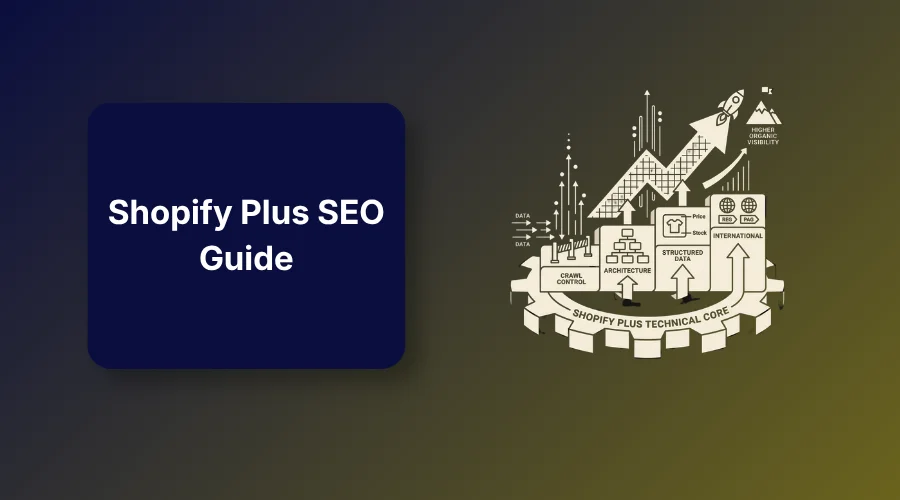
A Shopify Plus SEO guide helps enterprise merchants scale search visibility by fixing duplicate URLs, controlling crawl waste, improving site speed, optimizing collection architecture, and applying accurate structured data across large product catalogs.
The Shopify Plus SEO guide solves the complex organic growth challenges of running a high-volume ecommerce store. Your product line expands every month, yet your organic growth stays flat.
Your marketing budget goes toward paid ads, but rising acquisition costs eat into your profit margins.
Unfiltered search parameters, app bloat, and poor internal link paths create hidden structural issues. These issues hide your best products from search engines and waste valuable budget.
That said, this guide talks about enterprise index control, site architecture, structured data validation, and international expansion steps for high-scale merchants.
What is Shopify Plus SEO?
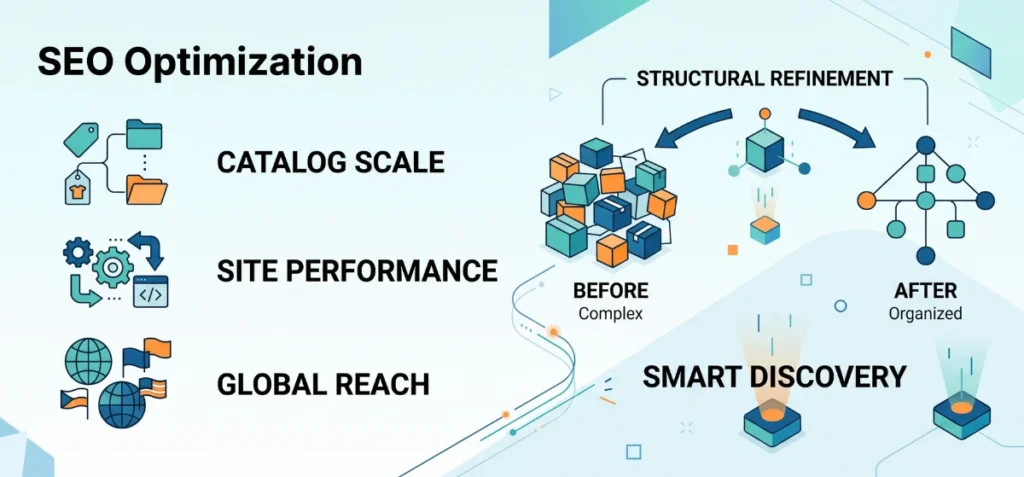
Shopify Plus SEO is the process of optimizing an enterprise store for organic search. Large catalogs and custom code bases create unique technical challenges.
Standard store setups handle basic product listings well, but enterprise operations require active management of crawl paths, site architecture, and script performance.
This optimization work targets high-intent search traffic. Enterprise stores often manage thousands of product variants, custom app integrations, and multi-regional storefronts.
Unmanaged inventory updates create massive URL bloat. This bloat dilutes link equity and hides priority pages from search engine crawlers.
Shopify Plus SEO addresses these structural risks directly. Merchants clean up indexation rules, refine internal link paths, and speed up page rendering. The goal is simple.
Clean store architecture helps search engines discover, process, and rank your highest-margin products
How Shopify Plus SEO Differs From Regular Shopify SEO
Regular Shopify stores focus on basic technical SEO, keywords, product pages, and blog content.
Shopify Plus stores face these same SEO fundamentals, but at a far larger scale.
| Feature Area | Regular Shopify SEO | Shopify Plus SEO |
| Catalog Scale | Small inventories with simple URL structures. | Massive catalogs that create duplicate URLs and crawl waste. |
| Store Setup | Standard themes with minimal custom scripts. | Custom code and app stacks that slow down performance and break schema. |
| Market Reach | Single domain or single region focus. | Multi-store expansions with complex international targeting. |
Shopify Plus provides more capabilities for enterprise operations, but it doesn’t automatically improve organic rankings.
The Shopify Plus SEO Checklist: What to Prioritize First
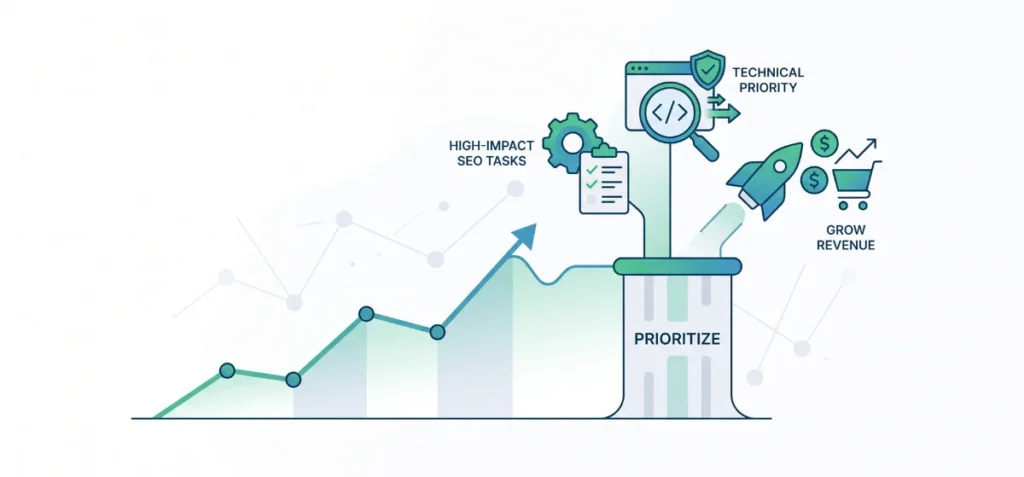
This framework helps enterprise merchants organize high-impact SEO tasks based on technical priority.
- Verify that crawlers can discover and index your key revenue pages.
- Reduce crawl waste by blocking low-value search and filter parameters.
- Fix duplicate URL paths with consistent canonical tags.
- Improve collection hierarchy to match high-volume search intent.
- Optimize title tags and descriptions on priority product pages.
- Audit third-party apps and JavaScript to protect Core Web Vitals.
- Validate structured data across product and collection templates.
- Configure international market signals using clean URL structures.
- Track indexation trends and search metrics after major code updates.
Check Out This Ultimate Shopify Plus SEO Guide for Store Growth
Learn how to fix indexation issues, manage crawl paths, and build an enterprise store layout that ranks.
1. Control Crawl Waste Before It Becomes an Indexation Problem
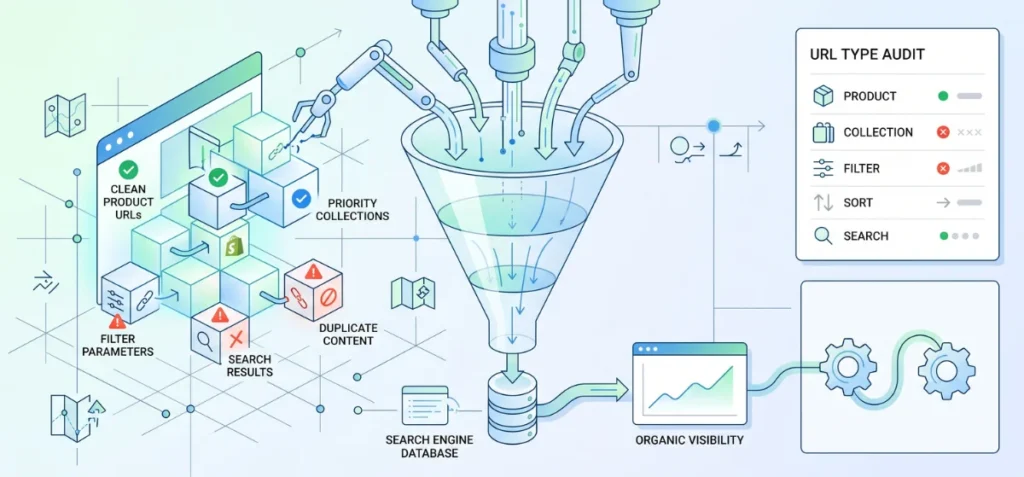
Search engines handle web pages through three clear stages: crawling, indexing, and ranking. Crawling means discovery bots fetch your site files and pages.
Indexing happens when search engines process those fetched pages and save them in a central database. Ranking occurs when algorithms evaluate those indexed pages to show the best results for a search query.
Shopify Plus stores often generate thousands of junk URLs that waste search engine attention. Large product catalogs create massive variations through automated filter parameters, sorting options, internally tracked search results, and collection-scoped product links.
Every color variant or product tag can accidentally create a unique URL string. Search engine bots have limited time and resources for each website.
Bots that spend time scanning useless parameter links might miss high-margin products and top-level collections entirely. You must manage these waste paths before indexation bloat hurts your organic visibility.
Audit These Shopify URL Types
| URL Type | SEO Priority | What to Check |
| Product pages | High | Indexability status and clean canonical links |
| Collection pages | High | Unique search intent targeting |
| Filter URLs | Usually low | Crawl access and indexation tags |
| Sort URLs | Usually low | Duplicate content parameters |
| Search URLs | Low | Blocking parameters to avoid junk pages |
| Variant URLs | Depends | Canonical consistency across color and size options |
| Paginated URLs | Medium | Product discovery and internal link depth |
| Discontinued products | Depends | Redirection rules or status handling |
Check Your robots.txt and Sitemap Setup
Never edit your robots.txt file without identifying a specific crawl waste problem. Check your Google Search Console indexation reports before changing any server file rules.
Verify that your core collection and product pages feature prominent internal links across the layout.
XML sitemaps and crawl instruction files function purely as technical discovery controls, not direct ranking boosters. Use them to guide search bots toward your priority business assets.
2. Fix Duplicate URLs and Canonical Problems at Scale
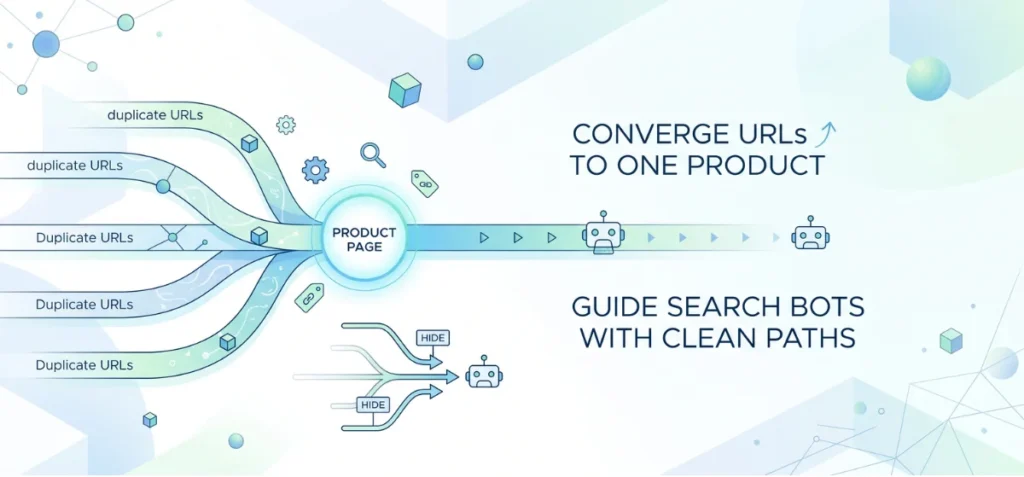
Large stores often make several web addresses for the exact same item. A single shirt might show up under five different collection addresses.
Search engines get confused when they see identical items on different pages. They don’t know which page should show up first in search results.
Check Collection-to-Product Links
Shopify often puts collection names inside product page addresses. This creates extra links for a single item.
- Always point internal links to the main /products/ address.
- Check your store code to make sure collection paths don’t mess up main product addresses.
- Inspect canonical tags on your main product templates to confirm they point to the main page.
Canonical tags work like signposts for search bots. However, signposts aren’t enough. Clean internal links must support those signposts so search engine bots don’t get confused.
Audit Filter and Parameter URLs
Shoppers use filters to sort items by size, price, or color. Each click creates a long web address with extra symbols.
- Color choices add extra tags to the main web address.
- Price sorts create temporary pages that copy main collections.
- Multiple filter options create hundreds of useless pages.
Only pages that solve a clear search need should enter search indexes. Hide useless filter pages from search bots. Your exact setup will depend on your theme and store apps.
3. Build a Site Architecture That Helps Search Engines Find High-Value Pages
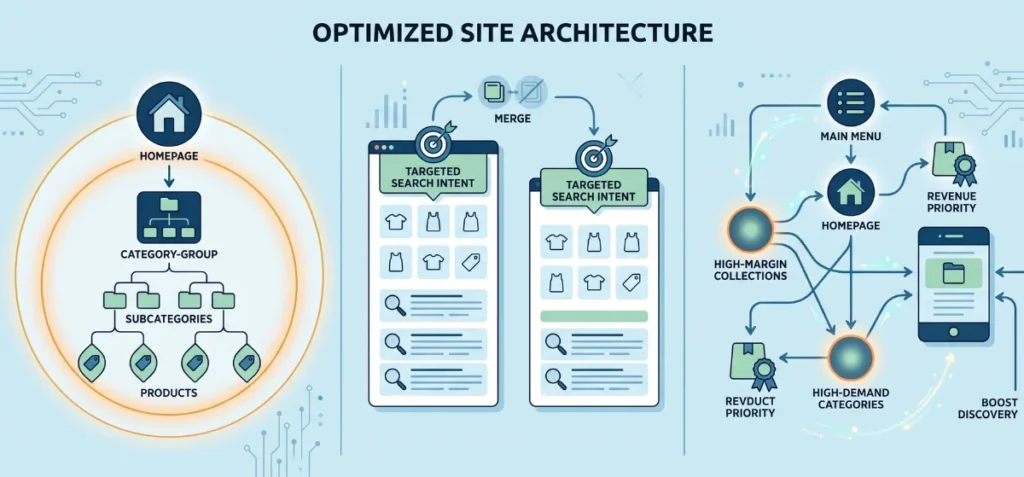
A clear store layout helps visitors and search engine bots navigate your catalog. You should organize your site structure into a simple, logical hierarchy:
- Homepage → Primary Collection → Subcategory → Product
Important revenue pages must stay close to your main homepage. Pages buried five or six clicks deep lose authority.
Search bots may ignore deep pages or crawl them far less often. Keep your key products within three clicks of the main menu.
Optimize Collections for Search Intent
Target one clear customer goal with each collection page. Avoid making tiny, empty collection pages that offer no unique value to shoppers.
- Focus every collection on a specific search topic.
- Add helpful text descriptions above or below product grids to give search engines clear context.
- Delete or merge collections that show identical product groups.
- Add direct links inside collection copy to send visitors toward relevant subcategories.
Clear collection layout guides buyers directly toward the right items.
Use Internal Links to Prioritize Revenue Pages
Internal links show search engines which store pages matter most. Put your primary link equity into your top commercial assets:
- Feature high-margin collections in main header menus.
- Highlight high-demand categories directly on your homepage.
- Add seasonal collections to prominent sidebar navigation blocks.
- Keep links to evergreen revenue pages active all year.
Smart internal linking boosts page discovery and proves business priority to search crawlers.
4. Optimize Product and Collection Pages for Shopify SEO
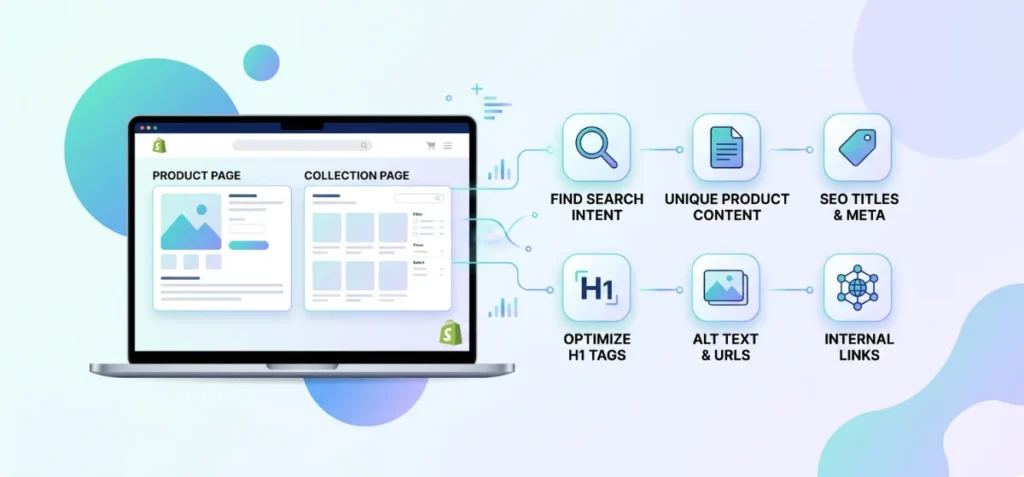
Product and collection templates drive the vast majority of organic sales. Optimizing these layouts requires a clear understanding of search intent.
Product pages must target specific, transactional search terms, such as exact model names or SKUs. Collection pages must target broader commercial category terms that help shoppers compare options.
Optimize These Elements
You can build strong search signals across large catalogs by refining key template elements:
- SEO Title & Meta Description: Write unique titles and descriptions that include primary terms and clear buying incentives.
- H1 Heading: Match the main heading directly to the primary topic of the page.
- Product Description: Provide distinct product details instead of standard manufacturer text.
- Collection Content: Add short, helpful descriptive text above or below product grids.
- Image Alt Text: Describe product photos clearly for accessibility and image search discovery.
- URL Handle: Keep web addresses clean, short, and focused on core terms.
- Internal Links: Connect related items and subcategories to pass link equity.
Never apply duplicate metadata across thousands of inventory items.
Unique metadata helps search engines distinguish between similar product variants.
Matching each page type to exact customer intent improves overall store rankings.
5. Audit Apps and JavaScript for SEO and Core Web Vitals
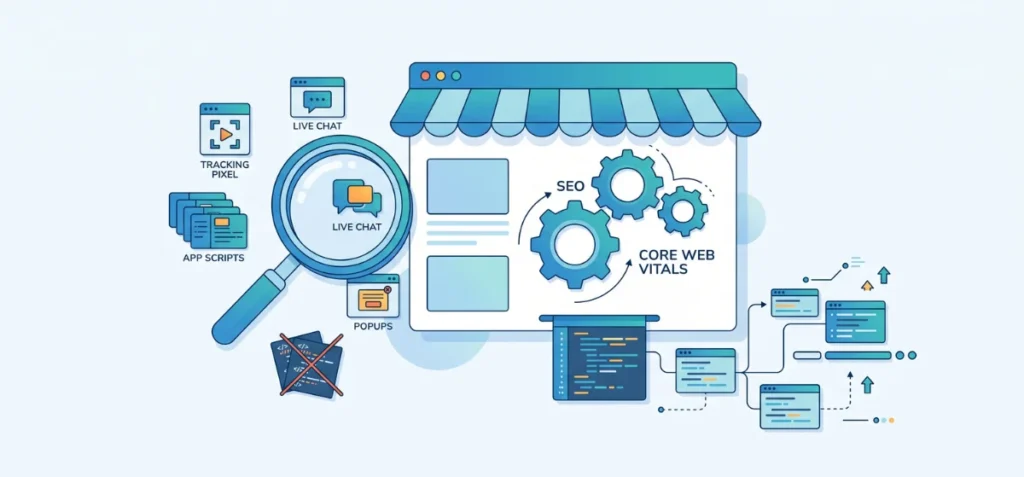
Shopify Plus stores often accumulate heavy script stacks as marketing operations expand.
Teams routinely add tracking scripts, live chat widgets, review forms, personalization tools, upsell popups, testing scripts, and tag managers.
Over time, these additions pile up. Unused code from uninstalled apps frequently lingers in theme files, dragging down site speed.
What to Check
Run routine technical checks across your theme code to spot hidden performance issues:
- Can search engines easily crawl and render your core product content?
- Did a recent app installation inject heavy JavaScript files into your header?
- Do you have multiple apps running identical functions like tracking or popups?
- Did a new tool slow down your actual page load speed?
- Are third-party tools creating duplicate schema markup on product pages?
- Did a recent theme update alter how your content renders in browsers?
Focus on Core Web Vitals, Not Just a Speed Score
Chasing a perfect PageSpeed score wastes time. Focus instead on fixing real user experience bottlenecks caused by heavy JavaScript and render-blocking code.
Large images often trigger Cumulative Layout Shift (CLS) issues, while excess main-thread work degrades Interaction to Next Paint (INP).
You need to remove script bloat to speed up rendering and keep real shoppers on your site.
6. Implement Structured Data Consistently Across Every Template
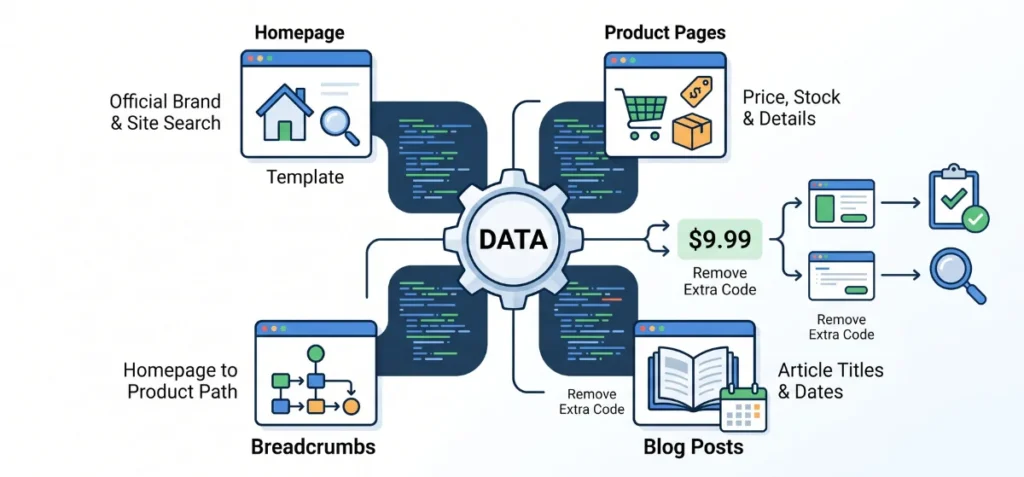
Structured data is special code that tells search engines exact details about your store. It helps your products show up with star ratings, prices, and stock details in search results.
Check your code by template type instead of looking at thousands of pages one by one.
Recommended Schema Map
Match the right code layout to each section of your store:
- Homepage: Use Organization and WebSite code to show your official brand name and site search box.
- Product Pages: Use Product and Offer code to list current prices, stock status, and item details.
- Breadcrumbs: Use BreadcrumbList code to show the exact path from your homepage to a product.
- Blog Posts: Use Article code so search engines can read your post titles and publish dates.
Audit for Schema Conflicts
Apps and themes can accidentally add double code to the same page. Two apps might report two different prices for the exact same item.
Test sample web addresses from each template using official Google testing tools such as Rich Results Test, Schema Markup Validator, and Google Search Console (URL Inspection Tool).
Look for missing information or price errors. Remove extra schema code from old apps so search engines always get the correct facts.
7. Optimize International Shopify Plus Stores with Shopify Markets

Global expansion introduces complex search requirements. You must guide search engine bots to the correct regional pages when your brand expands into new countries. Shopify Markets helps you manage localized storefronts from one single dashboard.
Set up clean URL structures for each region. You can use subdomains, subfolders, or specific country domains for local shoppers.
Always translate your content accurately for local language versions instead of relying on cheap auto-translators.
Adjust currency settings, shipping details, and product availability to fit local demand. These localized details signal clear regional relevance to local search engines.
Check Before Launching a New Market
Run these checks before launching your brand in a new country:
- Is your country-specific URL structure clear and correctly mapped?
- Can search engine bots easily crawl every new regional page?
- Is your translated content helpful, accurate, and easy to read?
- Can search bots discover your regional subfolders through clear site links?
- Do your canonical tags and language signals match across every country store?
Smart planning prevents search engines from indexing broken regional templates.
8. Create an SEO Monitoring System for Shopify Plus
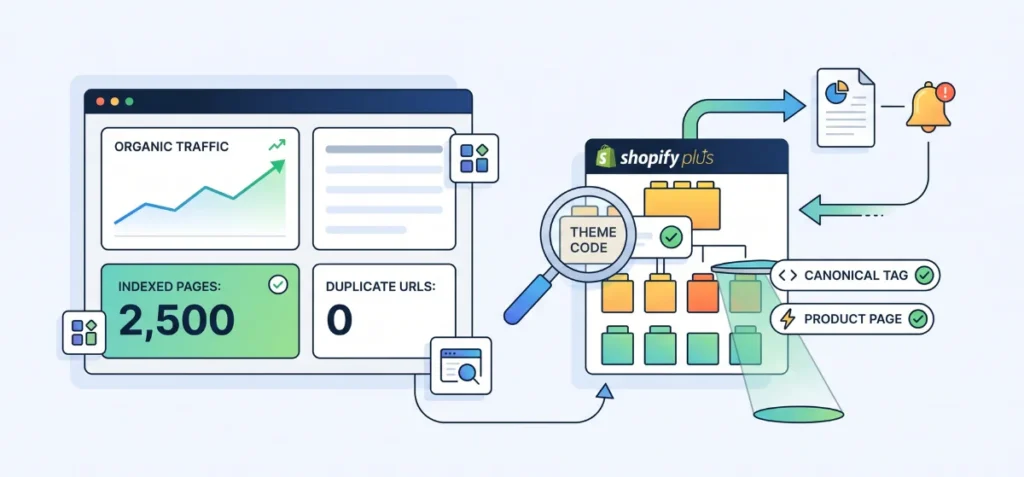
Enterprise stores change constantly. Development teams ship code updates every week. Marketing managers add new tools to boost conversions.
Organic traffic can drop suddenly when large store edits happen without technical review.
Track site changes to protect your organic traffic. Theme updates can erase critical template code without warning.
New app installs might inject heavy scripts into every page. Bulk product imports can create hundreds of duplicate web addresses.
Collection updates might alter internal link paths and hide top items. Site migrations can break existing web addresses. A solid monitoring system catches these accidents before they wreck your search rankings.
Monitor Every Month
Check these performance metrics every single month:
- Look for sudden spikes or drops in total indexed pages.
- Spot unexpected indexation warnings inside Google Search Console.
- Identify broken canonical tags or new duplicate product URLs.
- Review Core Web Vitals to catch sudden speed drops.
- Check schema report logs for new structured data errors.
- Track organic traffic and revenue across high-priority collections.
Run SEO QA Before Major Changes
Test major store updates in a staging environment before going live. Inspect core templates, internal link paths, and structured data setup.
Check whether canonical tags remain correct across product variants. Fix technical mistakes before launch to save hundreds of hours of cleanup work later.
How to Do SEO on Shopify Plus
Edit your store search settings with zero coding skills. You can update main page titles, search descriptions, image tags, and web addresses directly inside your admin dashboard.
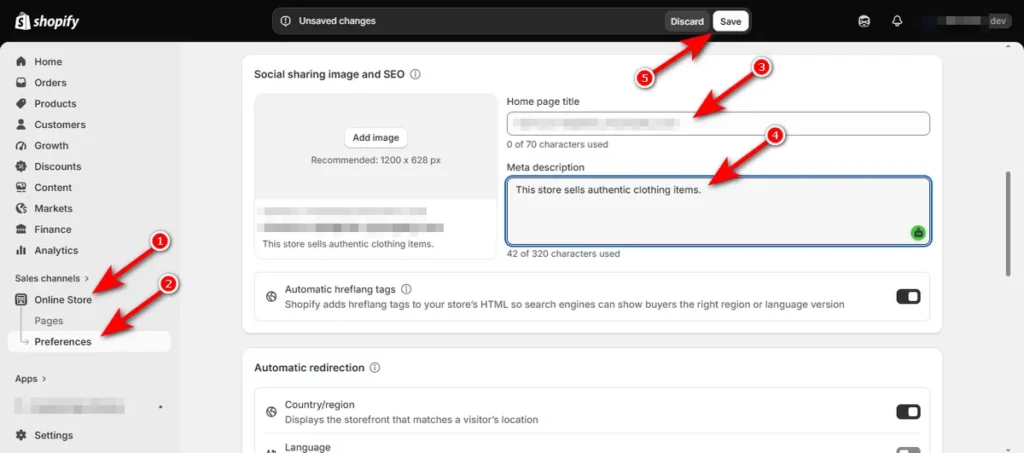
How to Do Homepage SEO
Update your homepage settings in a few quick clicks:
- Click “Online Store” on your left menu.
- Then, hit ‘Preferences’ to open your store settings and find “Social sharing image and SEO” area.
- Type your main title into the “Home page title” field. Keep this title under 60 characters and put your main brand name near the front.
- Type a short summary into the “Meta description” field. Keep it under 155 characters and add a clear reason to visit your store.
- Click ‘Save’ at the top right of your screen.
How to Do Product Page SEO
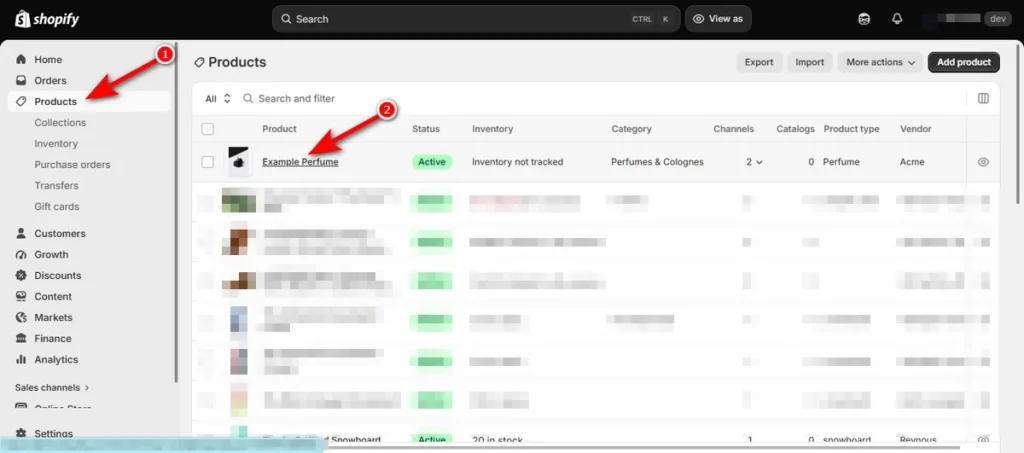
Update individual product search details inside your item editor:
- Click ‘Products’ on your left menu and select an item.
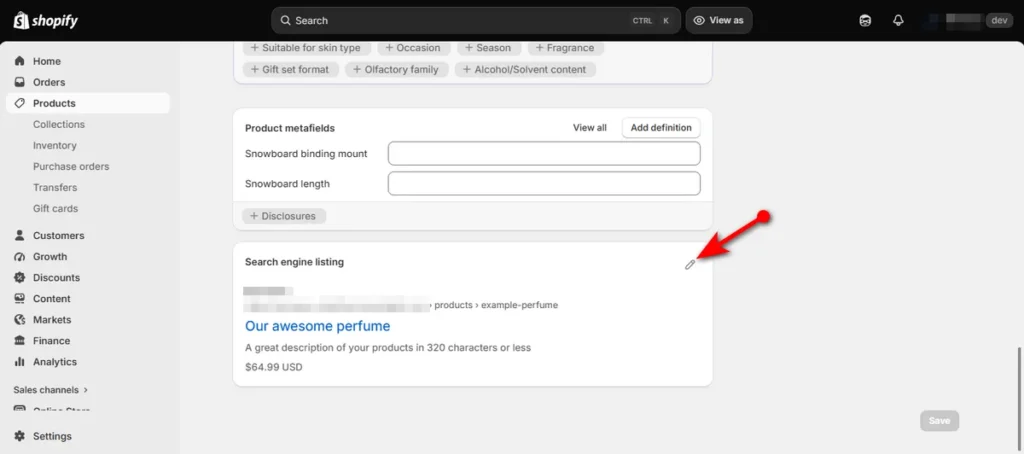
- Scroll to the bottom of the page and click the pencil icon inside the “Search engine listing” area.
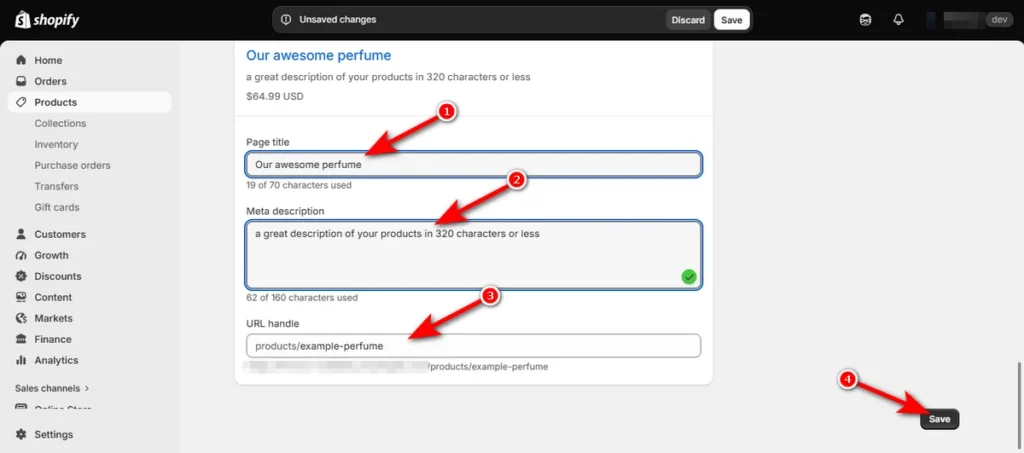
- Enter your new title into the “Page title” field. Match the exact product name and keep it short.
- Enter a quick description into the “Meta description” field. Include key product benefits and a soft call to action.
- Edit your web address in the “URL handle” field if needed. Use lowercase letters, separate words with hyphens, and remove unnecessary numbers.
- Click ‘Save’ button.
Be careful when you change web addresses. A changed link can break old connections and hurt your traffic. Always check the box to make a 301 redirect link so visitors find your new page.
Edit Image Alt Text
Add quick photo descriptions to help search engines read your images:
- Go to ‘Products’ and open a product.
- Scroll to the ‘Media’ area on your product page and click a photo.
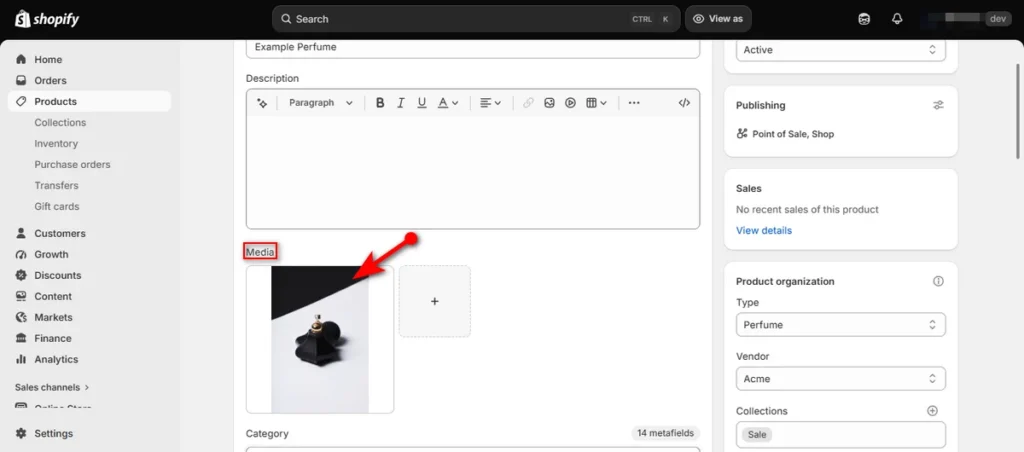
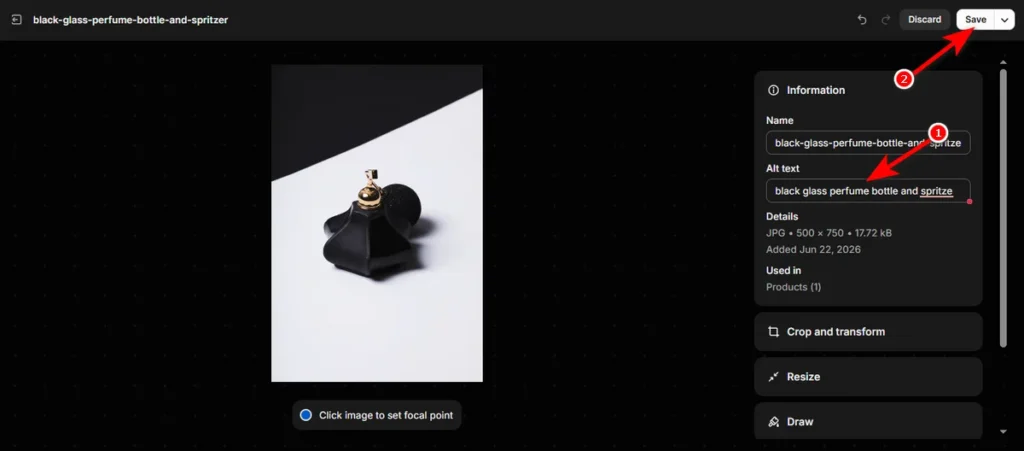
- Type what the photo shows into the “Alt text” field. Describe the exact item, color, and material without forcing extra keywords.
- Click ‘Save’ at the top right of your screen.
How to Do Collection Page SEO
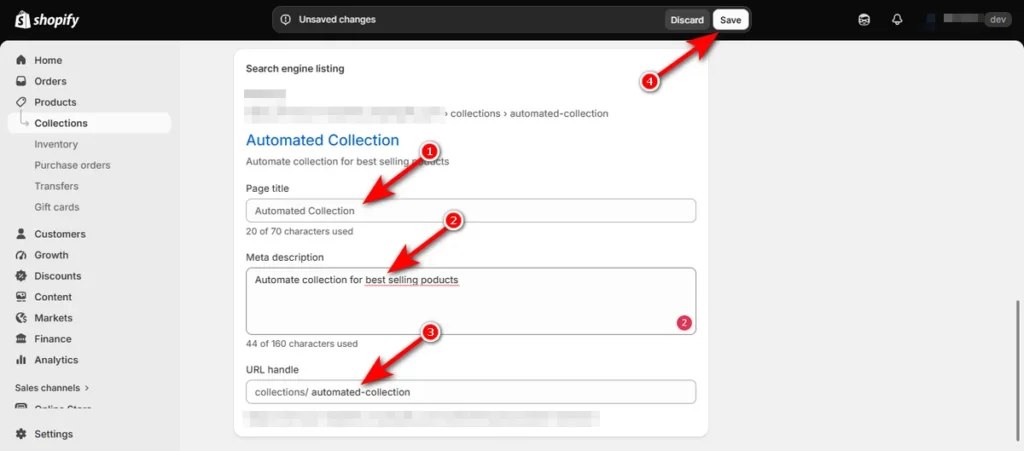
Manage collection search details directly inside your collection editor:
- Click ‘Collections’ on the left side panel and pick a collection.
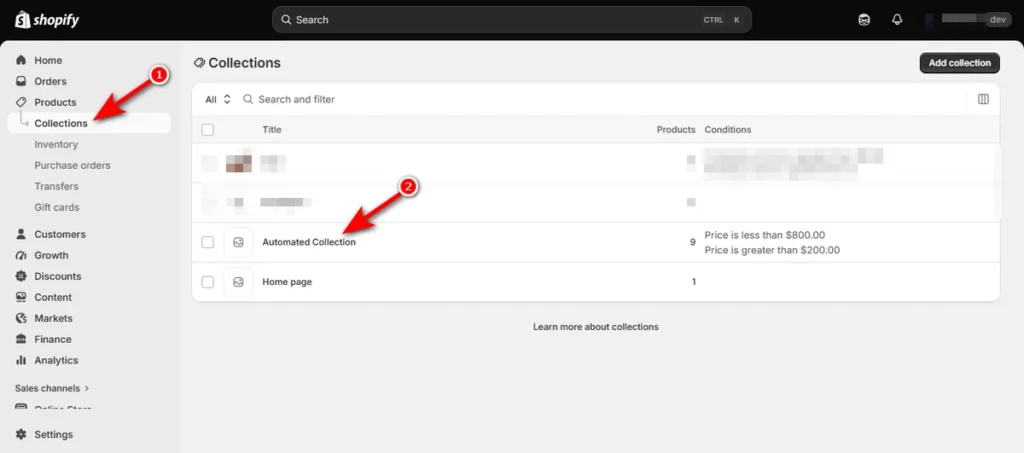
- Scroll down to the bottom and click the pencil icon inside the “Search engine listing” area.
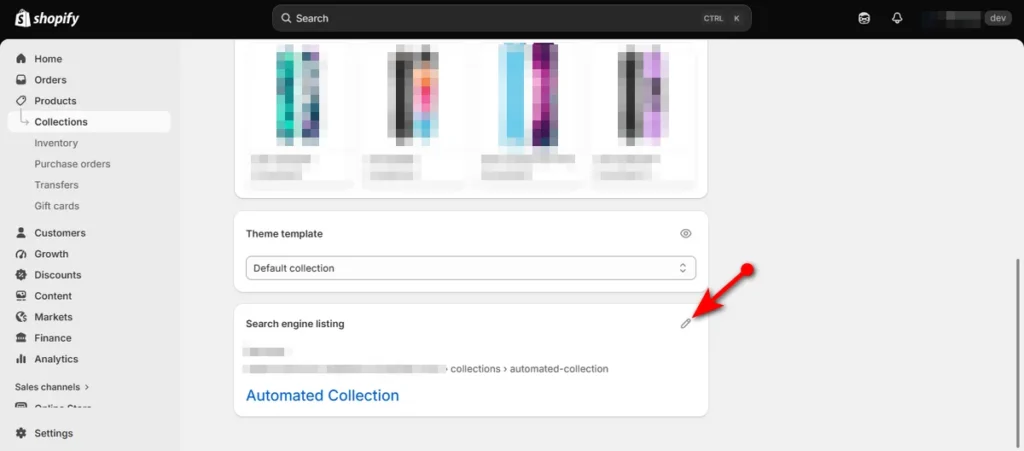
- Type your category name into the “Page title” field. Focus on broad, commercial search phrases that shoppers use for full product groups.
- Type a short overview into the “Meta description” field. Summarize what items shoppers will find inside the group.
- Edit your web address in the “URL handle” field if you want to. Keep the text clean, simple, and readable for human shoppers.
- Hit the ‘Save’ button.
Shopify SEO Tools I Recommend for Plus Stores
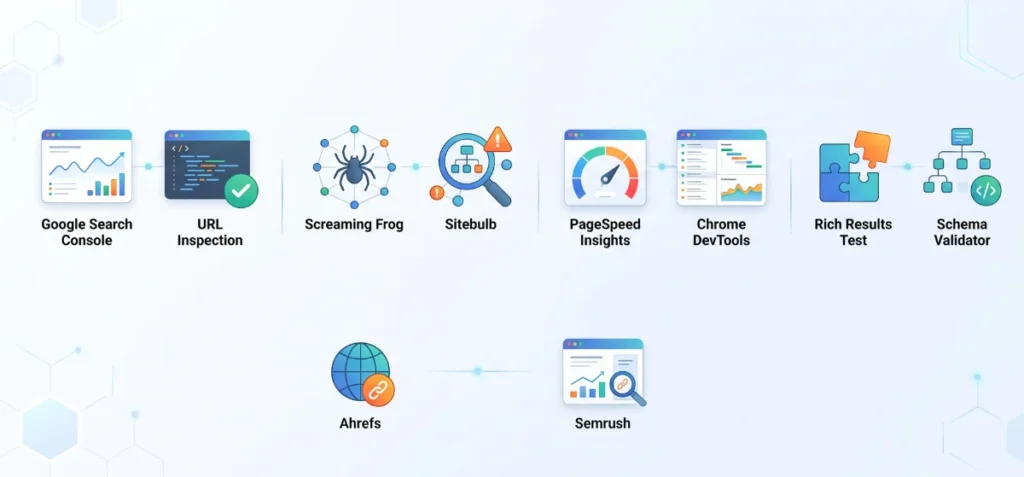
Enterprise store managers rely on effective Shopify SEO tools to spot crawl bottlenecks, measure page speed, validate template code, and spot high-value commercial search terms.
Search and Indexing
- Google Search Console: Use this tool to track organic click patterns, flag indexation errors, and monitor search query performance.
- URL Inspection Tool: Test live page code to verify exact index status and rendering details directly from Google.
Technical Crawls
- Screaming Frog: Audit massive site layouts to spot broken links, redirect chains, and canonical errors at scale.
- Sitebulb: Visualize internal link paths and discover structural site health issues through clean visual graphs.
Performance
- PageSpeed Insights: Measure real-world Core Web Vitals to highlight layout shifts and slow script performance.
- Chrome DevTools: Inspect main-thread work, network requests, and heavy JavaScript files directly inside your browser.
Structured Data
- Rich Results Test: Verify whether your product and collection code supports star ratings and price snippets in search results.
- Schema Validator: Check custom schema code syntax across your Liquid template files.
Keyword Research
- Ahrefs: Analyze competitor link profiles and discover buyer search demand across large catalogs.
- Semrush: Track daily ranking shifts and uncover commercial keywords for core collection pages.
When Should You Hire a Shopify SEO Expert?
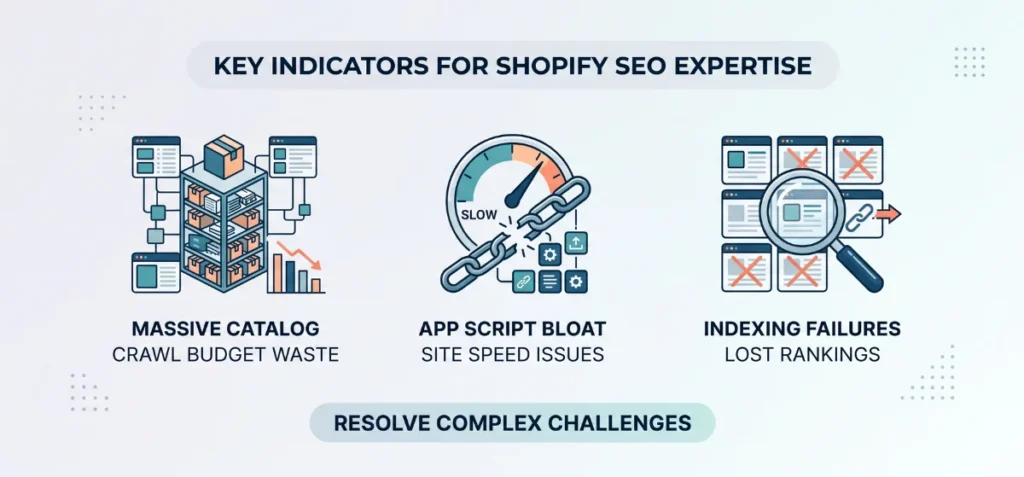
Even though you have in-house marketing teams, sometimes, they may struggle to manage technical issues at scale.
At that time, you can bring in a specialized Shopify SEO expert when your store faces complex operational barriers:
- Massive Catalog Size: You manage thousands of products, variants, and collections that create endless duplicate pages and waste your crawl budget.
- Persistent Indexing Failures: Search engines stop indexing your key product pages or collections without clear reasons.
- App-Induced Script Bloat: Multiple installed apps inject heavy JavaScript files into your theme, ruining your Core Web Vitals and site speed.
- Faceted Navigation Messes: Your filter parameters generate thousands of junk web addresses that confuse search engine bots.
- Platform Replatforming or Migrations: You move to Shopify Plus from another platform and need to map 301 redirects to protect hard-earned rankings.
- Unexplained Traffic Drops: Your store loses organic search traffic suddenly after a theme update or layout change.
- International Expansion Hurdles: You launch multi-region stores with localized subfolders or subdomains and need to configure complex language signals.
- Conflicting Schema Markup: Custom Liquid theme edits and apps inject broken or duplicate product schema code across your product pages.
Final Shopify Plus SEO Checklist
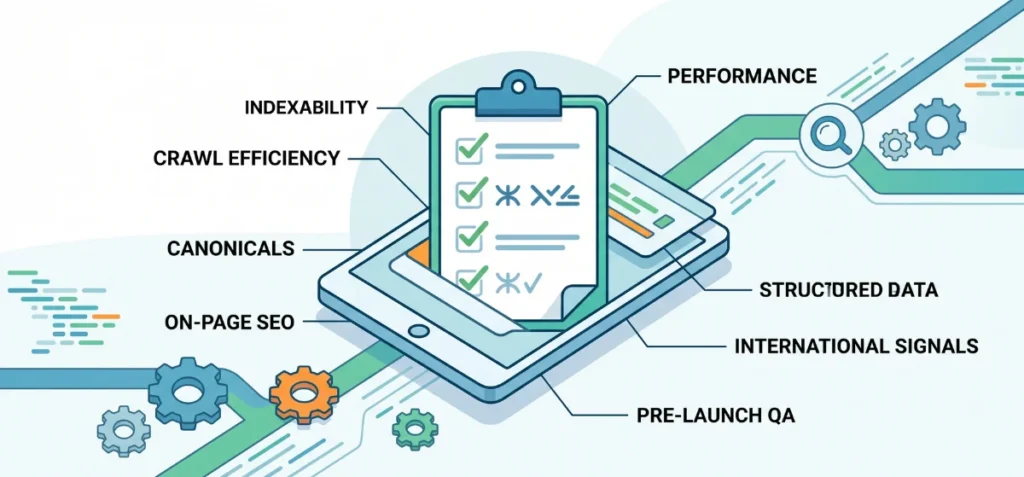
Use this final checklist to keep your enterprise store technical health in check:
- Important product and collection pages stay fully indexable for search bots.
- Low-value filter and sort URLs do not generate unnecessary crawl waste.
- Preferred canonical product links feature consistently across your internal link paths.
- Canonical tags point accurately to primary product and collection pages.
- Primary collection pages match distinct, commercial search intent.
- Product titles, meta descriptions, and handles follow on-page SEO best practices.
- Third-party apps and heavy JavaScript files undergo routine performance audits.
- Core Web Vitals remain strong to protect user experience and rankings.
- Structured data markup renders clearly across templates without duplicate code conflicts.
- International market signals use correct URL structures and localized content settings.
- Technical SEO QA checks happen before every major theme launch or site migration.
FAQs
Does Shopify Plus help with SEO?
Shopify Plus does not automatically boost your search rankings. It provides advanced code access and script control to help developers manage large product catalogs, custom code setups, and international stores better.
Is Shopify Plus Better for SEO Than Shopify?
Both plans rely on identical core SEO features. Shopify Plus handles large international stores, massive catalogs, and custom code setups far better for enterprise brands.
How Do I Edit SEO on Shopify?
Open any product or collection page inside your Shopify admin dashboard. Scroll down to the “Search engine listing” section and click the edit pencil icon to change your title tags, meta descriptions, and URL handles.
What is the Biggest SEO Problem for Shopify Plus Stores?
Duplicate URL sprawl from collection paths and tag filters causes the biggest issue. Heavy app scripts also slow down render speeds and hurt Core Web Vitals if left unmonitored.