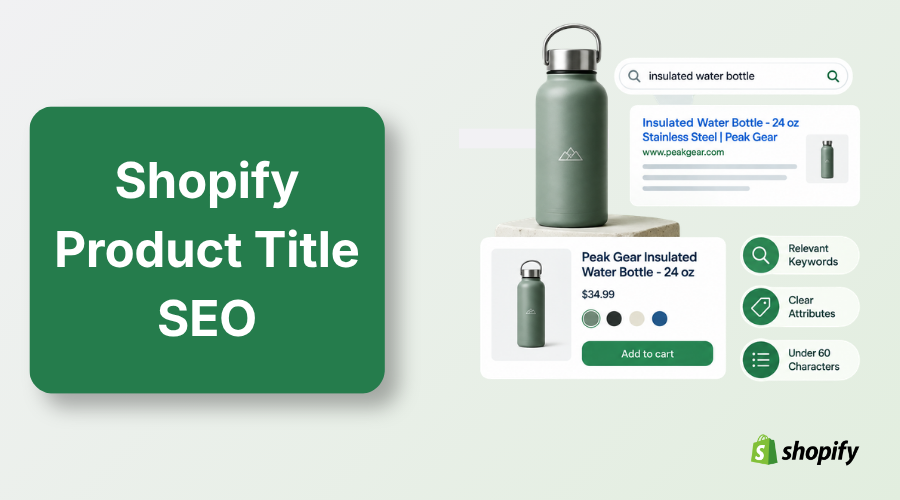
Shopify product title SEO matches product names with shopper search intent. Keep your on-page product title natural. Put your primary search term first in your SEO title tag. Add clear attributes like size, color, or material. Keep it under 60 characters.
Bad Shopify product title SEO kills your sales before buyers ever see your items. Great products stay hidden on page five because shoppers search with different words than you use.
You lose easy clicks to competitors every day. Creative names sound clever, but search engines need direct facts to show your listings.
This guide gives you clear title formulas, attribute rules, and step-by-step optimization tactics that attract ready buyers.
What is Shopify Product Title SEO?
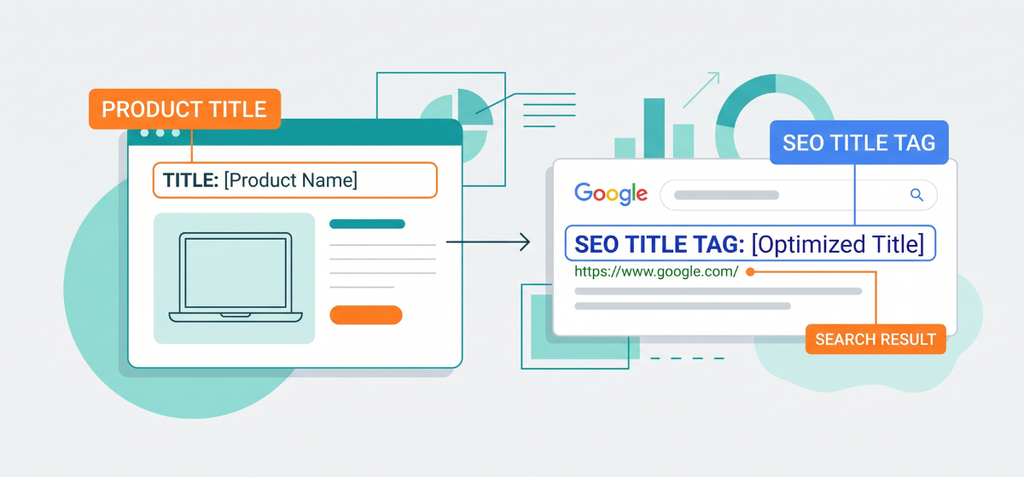
Shopify product title SEO is the process of optimizing your customer-facing product name and search engine title tag.
It helps search engines and shoppers understand what the item is, who it is for, its core differentiator, and the exact search intent it satisfies. Strong titles boost your e-commerce SEO and pull in qualified traffic.
Do not confuse these three elements:
- Product title: The visible name on your product page.
- SEO title tag: The clickable blue link shown in Google search results.
- Google Shopping title: The structured product feed label used for shopping ads and free listings.
According to the Shopify Help Center, your main product title automatically generates your product page SEO H1 tag in standard themes.
Scroll down to the Search engine listing section in your admin dashboard to customize the separate SEO title shown to searchers.
How to Write an SEO-Friendly Shopify Product Title
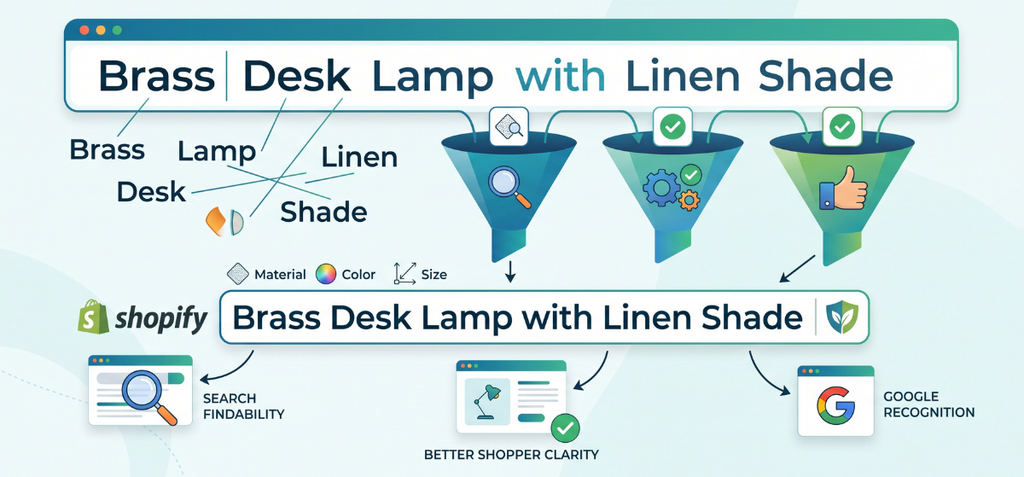
You can write great titles with simple steps. A good title helps buyers find your goods fast. It also helps Google understand what you sell.
Start with the Product People Actually Search for
Name the exact item first. Fancy creative names confuse real shoppers. Nobody searches for strange fantasy words. People search for basic items.
- Weak: Aurora
- Better: Brass Desk Lamp
- Best: Brass Desk Lamp With Linen Shade
Exact keywords are not a strict rule. But the Shopify Help Center tells store owners to place important product words right at the start.
Add Only the Attributes That Help the Search Decision
Buyers search with clear details. You can add specific facts to match their search:
- Material: linen, brass, leather
- Color: matte black, olive green
- Size: 12 oz, 40L
- Model: Series 4
- Audience: men’s, kids
- Key feature: waterproof, dimmable
- Use case: trail running, home office
Google Merchant Center guidance asks sellers to list clear attributes. Put your top details first.
Use One Clear Primary Topic
Pick one main topic for each title. Do not stack five words that mean the same thing. Google sees repeated words as spam.
- Bad: Women’s Running Shoes Running Shoes Sneakers Best Running Shoes
- Better: Women’s Trail Running Shoes – Waterproof
Modern search engines know synonyms. You only need one clear phrase to rank well.
Keep Brand Placement Intentional
Brand position depends on your brand fame. Big names pull clicks right away. Unknown names work better at the end.
- New brand format: Product Type + Feature + Brand
- Famous brand format: Brand + Product Type + Feature
Google Merchant guidelines suggest adding the brand name when buyers use it to make a choice.
Write for the Shopper First
Real people read your titles every day. They see them on product grids and internal search bars. A title full of robot keywords looks cheap. Simple, honest words earn the sale every time.
Shopify Product Title SEO Formula + Examples
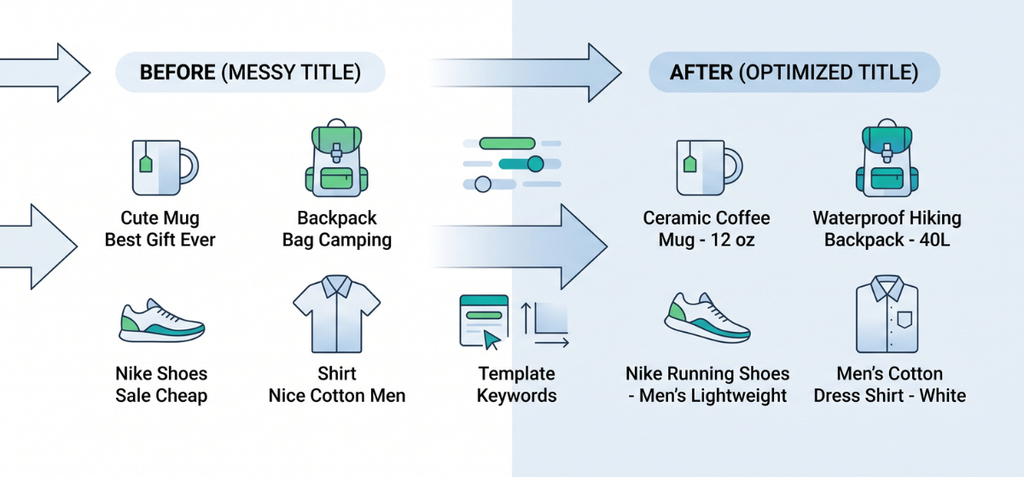
Different stores need different title structures. No single formula works for every single item. Flexible templates help you build clean names.
Formula 1: Generic Ecommerce
Structure: Primary Product Type + Key Differentiator
Example: Ceramic Coffee Mug – 12 oz
Formula 2: Feature-Led
Structure: Product Type + Feature + Use Case
Example: Waterproof Hiking Backpack – 40L
Formula 3: Brand-Led
Structure: Brand + Product Type + Key Attribute
Example: Nike Running Shoes – Men’s Lightweight
Formula 4: SEO Title Tag
Structure: Primary Product Term | Differentiator | Brand
This layout is a helpful guide, not a rigid rule. Adapt the order to fit your specific market.
| Item Type | Before (Messy Title) | After (Optimized Title) |
| Coffee Mug | Cute Mug Best Gift Ever | Ceramic Coffee Mug – 12 oz |
| Backpack | Backpack Bag Camping | Waterproof Hiking Backpack – 40L |
| Shoes | Nike Shoes Sale Cheap | Nike Running Shoes – Men’s Lightweight |
| Shirt | Shirt Nice Cotton Men | Men’s Cotton Dress Shirt – White |
Shopify Product Title vs SEO Title vs Google Shopping Title
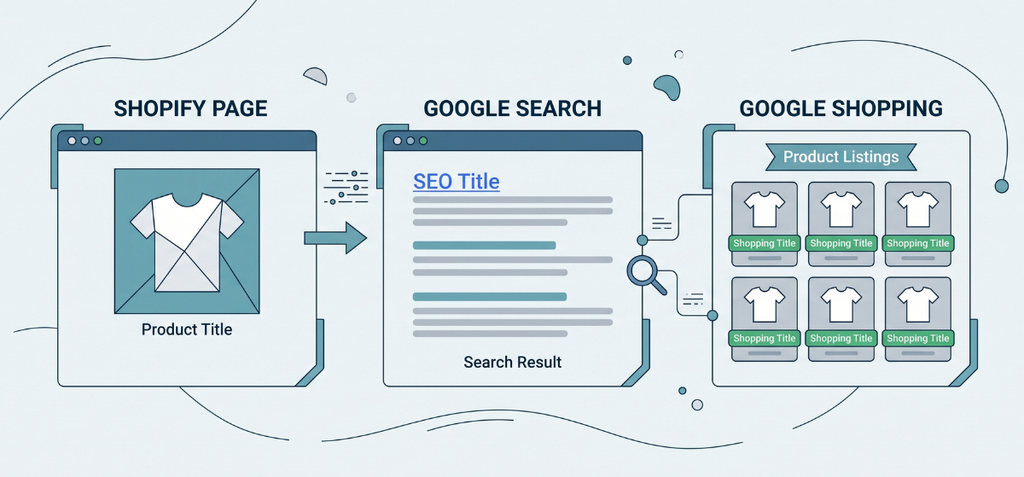
Many merchants mix up their product titles. Each title type lives in a different spot. Each one serves a different job.
| Element | Where Shoppers See It | Main Purpose |
| Product title | Product page and shop catalog | Product identity and H1 tag |
| SEO title | Google web search results | Search relevance and click appeal |
| Google Shopping title | Shopping tabs, free listings, and ads | Exact product-query matching |
| Structured product name | Search backend systems | Machine-readable product data |
Keep your visible product title natural and simple. You want visitors to feel at home when they land on your page. Short names look clean on your site.
Customize the SEO title when your on-page product name lacks search intent. For example, a shirt named “The Classic” works fine on your site.
But Google searchers never type that phrase. Change the SEO title to “Men’s Oxford Cotton Shirt – White” inside your admin panel.
If you run a large catalog, my Shopify Plus SEO guide breaks down how to manage these title fields at scale.
Shopify Help Center gives you a separate field to edit this web search title. Meanwhile, Google Merchant Center guidelines allow longer, attribute-rich titles in your product feed so shopping ads match exact queries.
Remember one hard truth from Google Search Central. Google uses multiple on-page signals to build title links.
Google might rewrite your SEO title tag if algorithms find other text on the page that better answers the user’s search query. Give every page a clean, clear title to get the best match.
Where to Add Keywords on a Shopify Product Page
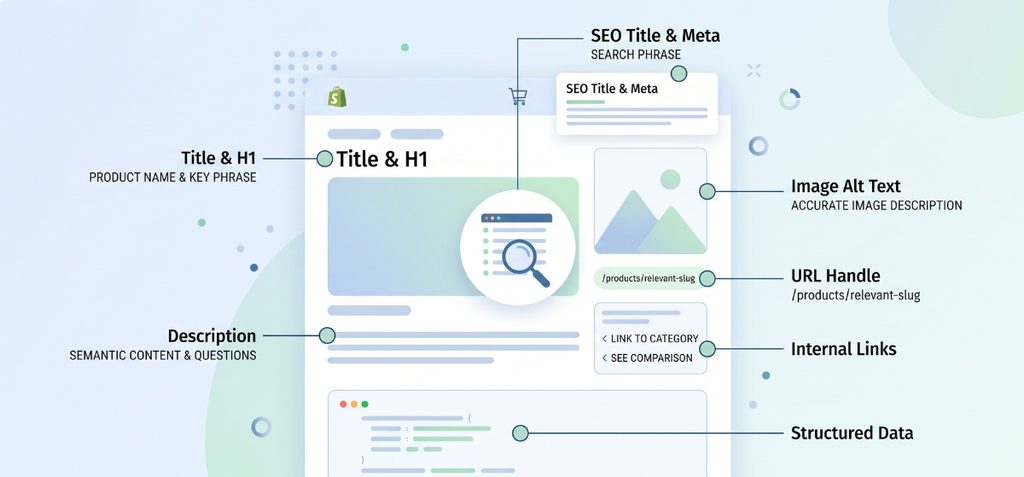
A product title works best when the whole page backs it up. Place relevant search terms across key page elements to send strong topical signals.
| Location | What to Optimize |
| Product title / H1 | Primary product phrase |
| SEO title | Search-facing phrase |
| Meta description | Supporting context and click appeal |
| Product description | Semantic coverage and buying questions |
| Image alt text | Accurate image description |
| URL handle | Clean product slug |
| Internal links | Relevant descriptive anchors |
| Structured data | Accurate product information |
The Shopify Help Center confirms you can place keywords in titles, H1 headings, and product descriptions.
However, Shopify alt-text rules state you should describe the image accurately instead of stuffing keywords.
Link relevant category, comparison, and educational content to the product page with concise, descriptive anchor text.
Google Search Central recommends informative headings, a logical site structure, and clear internal link text to help bots crawl your catalog.
Learn the full setup process in our guide on how to add keywords to your Shopify website.
How to Optimize Shopify Product Titles for Google Shopping
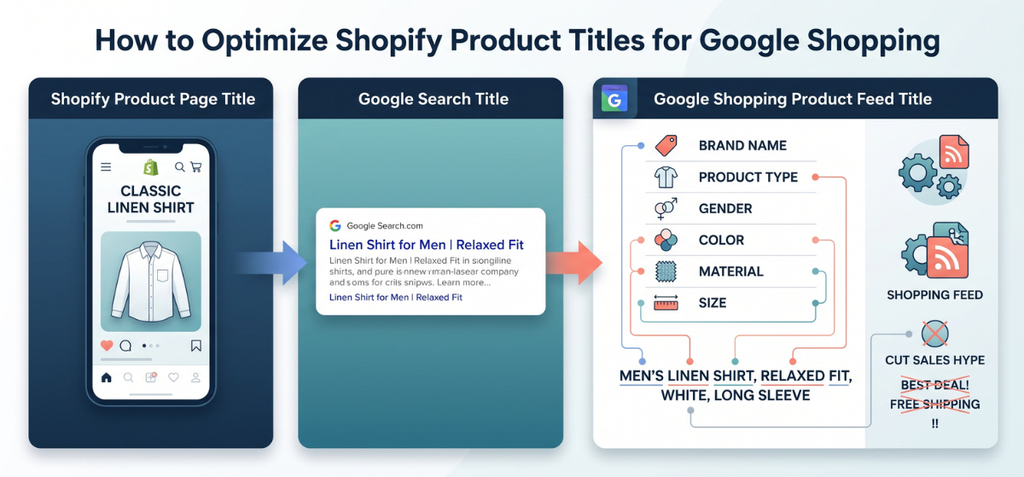
Google Shopping demands more raw detail than a standard web page title. Web search titles focus on quick clicks, but product feed titles power exact match algorithms inside Google Merchant Center.
Feed titles require rich attributes so shoppers can filter options easily. Include:
- Brand name
- Product type
- Gender or audience
- Color, material, and size
- Variant specifics
Google Merchant Center guidelines require titles that accurately describe the product and clearly distinguish each variant.
Google also urges merchants to place critical attributes early in the title string before text cuts off on mobile screens.
Cut all sales hype from these feed titles. Avoid words like “Free Shipping,” “Cheap,” or “Best Deal.” Drop spammy formats like ALL CAPS, exclamation points, and weird emojis. Google often rejects products with gimmicky titles.
Different title fields solve different problems for the same item:
- On-page shop title: Classic Linen Shirt
- Google SEO title: Linen Shirt for Men | Relaxed Fit
- Google Shopping title: Men’s Linen Shirt, Relaxed Fit, White, Long Sleeve
This clear breakdown proves why the three title spaces should not look identical. Your product page needs simple elegance. Your shopping feed needs pure descriptive data.
When you manage high inventory across multiple regions, a solid Shopify Plus strategy keeps these separate feed titles clean and organized.
How to Check Whether Your Product Title SEO is Working
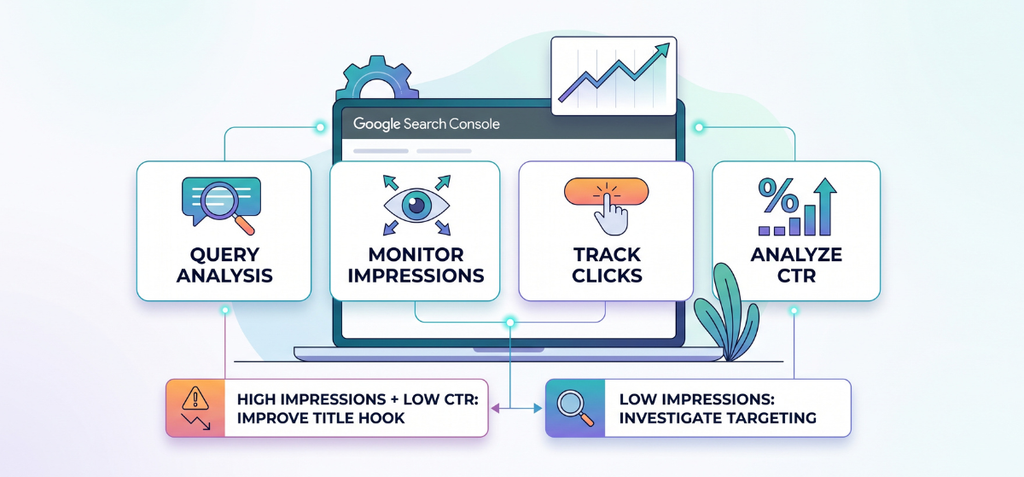
Track performance data to see if your new titles deliver results. Google Search Console provides the exact numbers you need for this check.
Open the Search Console Performance report. Filter by your specific product page URL. Monitor these metrics:
- Search queries
- Impressions
- Clicks
- Average CTR (Click-Through Rate)
- Average position
Google Search Central explains that Search Console reveals the real terms people type before they see your pages.
Follow this quick decision framework to take action:
- High impressions + low CTR: Test your SEO title tag. Write a more compelling hook to win more clicks.
- Low impressions: Investigate your query targeting, search intent, indexing status, and page content.
- Good ranking + poor conversion: Check your product title clarity and page relevance. Ensure the product satisfies the visitor search intent.
Read my step-by-step guide to get your Shopify store to rank for keywords for deeper ranking audits. You can also analyze your on-page text length with my Shopify SEO Word Counter to keep descriptions balanced.
Common Shopify Product Title SEO Mistakes
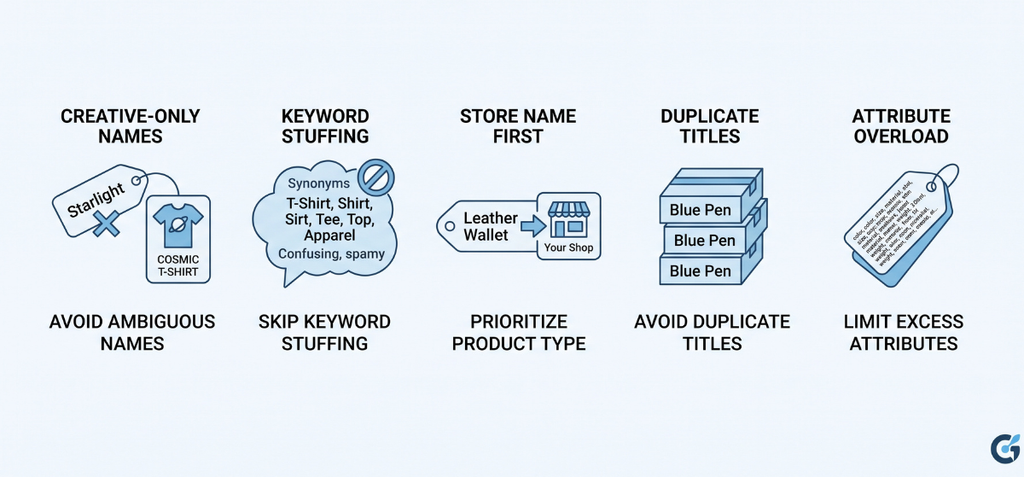
Avoid these eight common pitfalls when you name products on your store.
- Creative-only product names: Naming an item “Starlight” hides the real product type from search bots and buyers.
- Keyword stuffing: Listing five synonyms in one title creates spam and drives shoppers away.
- Store name first: Pushing your shop name to the front wastes high-value space that belongs to the product type.
- Duplicate titles: Reusing identical titles across similar items confuses search engines and causes internal competition.
- Attribute overload: Cramming every single specification into the visible title makes the text unreadable.
- Treating 60 characters as a strict wall: Pixel width matters more than strict character counts, though 50 to 60 characters remains a safe target.
- Conflicting title tags: Creating a visible title and an SEO title that describe two different products damages search trust.
- Ignoring Google Shopping titles: Leaving your merchant feed titles raw and basic loses easy ad clicks.
Google Search Central advises store owners to write concise, descriptive text while avoiding repetitive boilerplate and keyword spam.
Simple accuracy always beats over-optimized fluff. If you need expert hands to audit large catalogs, explore my dedicated Shopify SEO services or inspect past client wins in my Shopify SEO portfolio.
Shopify Product Title SEO Checklist
Run through this quick checklist before you publish any product page.
- Product type is immediately clear.
- The primary search phrase fits naturally.
- An important differentiator appears near the front.
- The brand name sits in the right place.
- The title stays free of keyword stuffing.
- Variant details match the right SKU.
- The SEO title stays concise under 60 characters.
- The visible title stays clean and human-friendly.
- The shopping feed title includes key attributes like color and size.
- Product page copy supports the core title topic.
- Structured product data matches on-page details.
- Performance data is tracked inside Google Search Console.
Test and adjust titles across your store using my free Shopify marketing tools to keep your catalog optimized.
My Concluding Thoughts
Great Shopify product title SEO brings ready buyers to your shop every single day. Clear product names help real people pick your items over the competition.
Keep your on-page product names natural and simple. Put your top search terms in the SEO title tag. Feed rich details to Google Shopping. Test your clicks in Search Console, refine your words, and watch your sales grow.
FAQs
Can You Do SEO on Shopify?
Yes. Shopify provides auto-generated sitemaps, SSL certificates, and canonical tags out of the box. You can manually optimize title tags, meta descriptions, image alt text, and product page URLs directly.
What is a Good SEO Title?
A good SEO title is 50 to 60 characters long. It puts your primary keyword first, matches user search intent, includes your brand, and reads naturally without keyword stuffing.
How Long Should a Shopify Product Title Be?
Aim for 50 to 70 characters for your on-page title. Keep your separate SEO title under 60 characters so Google and mobile screens do not cut off important details.
What is an Effective SEO Product Description for Shopify?
An effective description uses 100% unique text that answers buyer questions directly. It leads with key benefits, places target keywords naturally without spam, and uses scannable bullet points for easy reading.