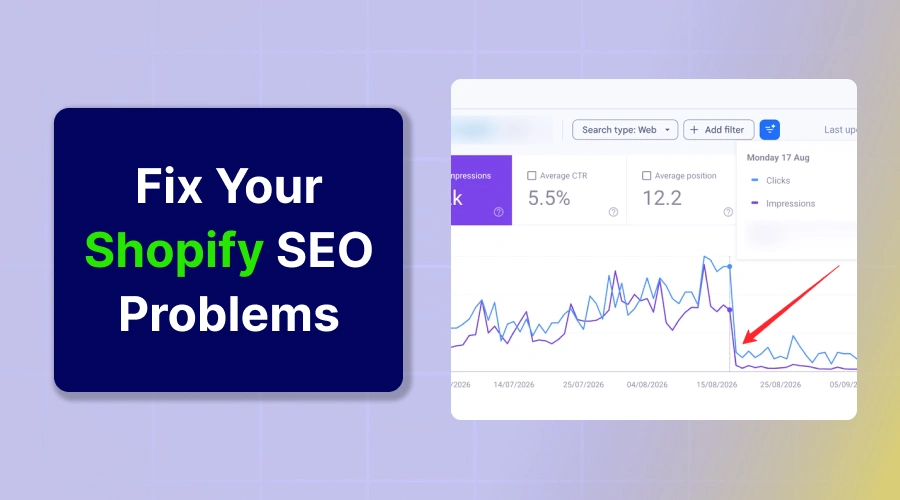
Shopify SEO problems stem from rigid URL rules, duplicate collection paths, and thin default pages. Heavy app code hurts page speed. Fix these issues by pointing internal links to canonical URLs, controlling filter crawling, and adding descriptive copy to collections.
Common Shopify SEO problems stop good online stores from getting Google traffic. You add great products, but buyers can’t find your store in search results.
This drop happens because the platform creates duplicate links, thin pages, and bloated code behind the scenes. These hidden errors confuse search bots and waste your site authority.
This guide reveals eight major Shopify SEO problems that hurt your organic search rank. You’ll learn direct steps to fix every single issue fast.
Check Out These 8 Common Shopify SEO Problems
These eight technical bottlenecks quietly drain your store traffic and sales every day.
1. Duplicate Product URLs and Canonicalization
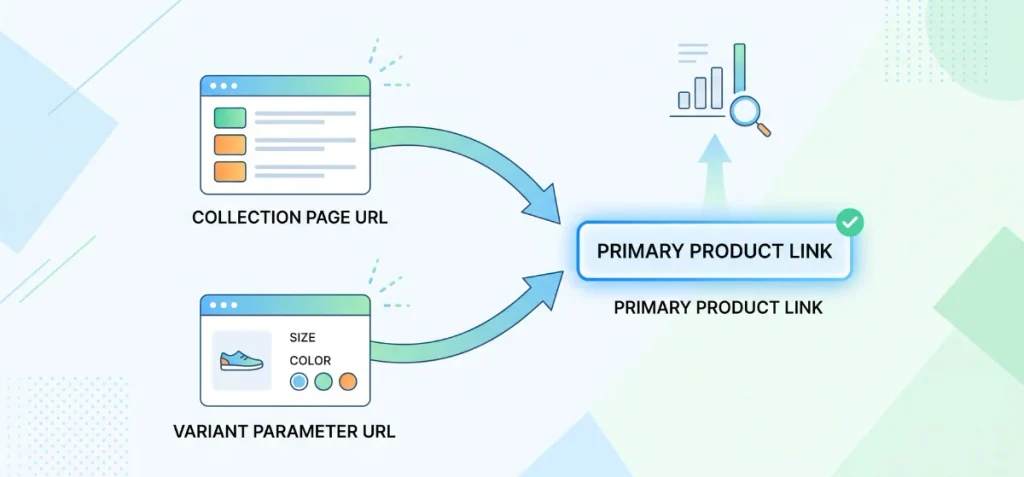
Shopify creates multiple paths for the same item by default. You can view an item at the direct path:
[store.com/products/running-shoes](https://store.com/products/running-shoes)
The platform also creates collection-based paths when shoppers browse your catalog:
[store.com/collections/mens/products/running-shoes](https://store.com/collections/mens/products/running-shoes)
Both pages display identical product descriptions, images, and prices.
This behavior creates duplicate URLs rather than duplicate content in the traditional sense. The text on the page remains identical, but the web addresses split your search signals.
Google views every unique web address as an independent candidate for ranking. When multiple addresses host the same product, search crawlers spend time evaluating both versions.
Shopify includes automatic canonical tags in standard themes to combat this issue. A canonical tag tells search engines which address serves as the primary master copy. The collection version points its canonical tag directly to the root /products/ link.
Automatic canonical tags do not fully solve the problem on their own. Google documentation on canonicalization explains that canonical tags act as strong hints rather than strict commands.
Search engines often ignore canonical tags if your site structure sends contradictory signals. Most default Shopify themes build their internal menu and collection links directly to the /collections/*/products/* paths.
Your store code constantly points visitors and crawlers to the non-canonical version. This confusion weakens link equity and splits backlink value. Your internal links must always point directly to the clean canonical product URL.
Product variants create another layer of duplicate URL problems. Shopify appends a tracking parameter like ?variant=12345678 to the end of your address when shoppers select different sizes or colors.
These parameter paths should always share the same root canonical tag unless the variant targets an entirely distinct search intent with unique descriptions.
You can diagnose these errors inside Google Search Console. Paste your non-canonical collection URL into the top URL Inspection tool. Check the field labeled “Google-selected canonical.”
Google might say “Duplicate without user-selected canonical” or state that it chose a different canonical than your declared tag. That mismatch proves your internal link signals conflict with your SEO goals.
If your team plans to expand catalog architecture, study the core Shopify Plus strategy to structure large collections properly from the start.
Key Takeaway: Don’t ‘fix’ duplicate URLs simply by adding more canonical tags. First, make internal linking consistent. Edit your theme code so collection grids link directly to the primary /products/ path.
2. Shopify’s Fixed URL Structure
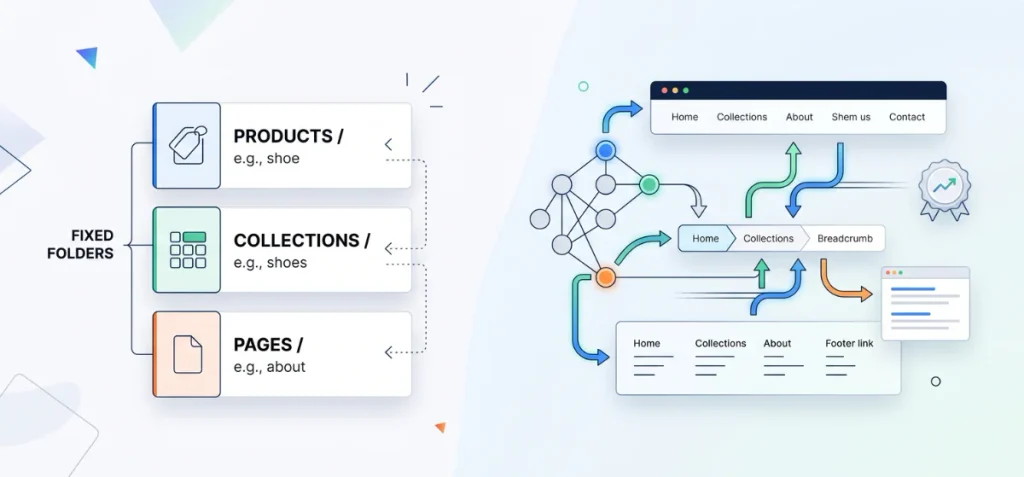
Shopify locks your store into rigid directory folders. Every page you create must live under a predefined subfolder:
- /products/ holds all individual product pages.
- /collections/ stores all category grids.
- /pages/ contains static information pages like about or contact.
You can’t remove these subfolders in native Shopify setups. You also can’t create nested folder paths like /shoes/women/sneakers/.
Many store owners panic over this rule. They believe this platform constraint ruins their search rankings.
This strict structure is not an automatic SEO disaster. Search engines do not rank websites based solely on URL path aesthetics.
Google’s ecommerce site structure documentation confirms that Google evaluates page relationships through internal links and navigation menus, not by URL paths alone. Clear internal linking and site architecture matter far more than a short web address.
Look at this simple example:
[store.com/collections/women/shoes](https://store.com/collections/women/shoes) vs. [store.com/shoes](https://store.com/shoes)
The second address looks cleaner to human eyes. The first address still ranks just as well in search results. Google doesn’t look at /collections/ and decide a page lacks quality.
Search bots follow your header links, breadcrumb trails, and footer menus to determine page importance.
A store with strong menu navigation and logical category grouping easily defeats a flat site with messy links.
Check out this Shopify Plus SEO guide to see how large brands organize catalog navigation without altering core URL structures. Use clear words in your product handles and let your internal links do the heavy lifting.
3. Filter, Tag, and Faceted URLs Creating Crawl Waste
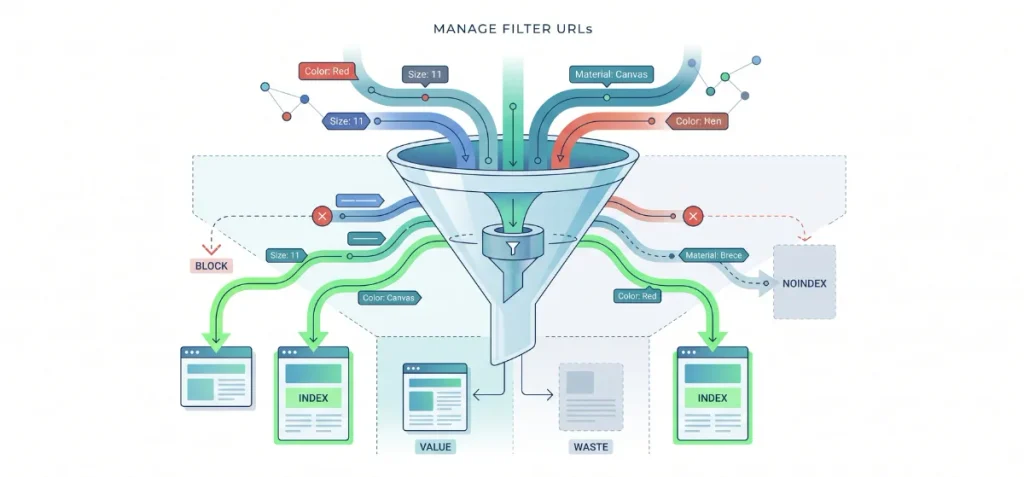
Faceted navigation helps buyers filter products by size, color, material, or price. This feature creates massive search traps if you leave it unchecked.
Old Shopify setups relied on basic product tags for filtering. Store owners created URLs like /collections/shoes/red+size-11.
Modern stores use the Shopify Search & Discovery app instead. This app generates filter parameter URLs like:
[store.com/collections/shoes?filter.v.option.color=Red&filter.v.option.size=11](https://store.com/collections/shoes?filter.v.option.color=Red&filter.v.option.size=11)
Every filter option adds another layer of parameters to the web address. A collection with four colors, five sizes, and three materials produces dozens of unique link combinations.
Large catalogs quickly generate thousands of near-identical URLs.
This multiplication creates severe crawl waste. Search engine bots possess limited time and resources to crawl your website.
When Google spends hours crawling empty filter combinations, bots miss your new products and updated pages.
Many of these filtered addresses load only two or three items, which creates thin, low-value pages that drag down your store quality score.
Some faceted pages offer genuine commercial value, while other combinations produce pure junk. A page for “red running shoes” often carries massive search volume.
A page combining “red, size 13, wide fit, under fifty dollars” has zero search demand. Blanketed rules fail here. Blindly adding noindex tags to every filter page destroys your chance to rank for profitable long-tail keywords.
You must also separate robots.txt disallows from noindex directives. A robots.txt rule stops Google from crawling a URL path.
Google can’t read on-page meta tags if you block crawling. Never add a noindex tag to a page that is blocked in robots.txt.
Use robots.txt to block endless, low-value parameter strings from wasting crawl resources. Use noindex on crawlable pages that you want search bots to evaluate without showing in search results.
Use this framework to manage your filter URLs:
| Filter URL Type | Recommended SEO Action | Reason |
| Has search demand and unique value | Consider indexation | Captures high-intent long-tail search traffic. |
| Duplicate or near-duplicate | Consolidate or canonicalize | Passes link signals back to the parent category. |
| Large number of low-value combinations | Control crawling or indexation | Prevents crawl budget waste on useless pages. |
| Useful for shoppers but not search | Keep UX, control SEO visibility | Preserves store experience without hurting rank. |
Shopify allows direct customization through robots.txt.liquid to prevent crawl traps. You can block useless sort parameters like ?sort_by= while letting valuable category filters stay open.
Take time to learn how to add keywords to a Shopify website so you build clean dedicated collection pages for popular search terms instead of relying on chaotic filter URLs.
4. Thin Product and Collection Pages
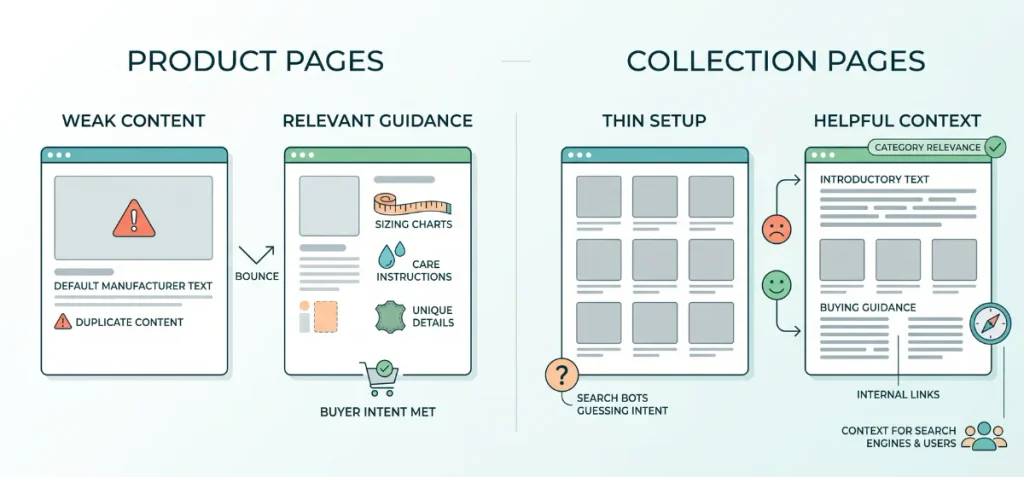
Empty pages destroy your organic rankings faster than almost any technical glitch. Search bots can’t rank pages that offer zero unique information. Many merchants try to fix this by writing fluff to hit arbitrary word targets.
Google explicitly states in its helpful content guidance that search algorithms do not have a preferred word count. Relevance, clarity, and buyer intent matter far more than sheer volume.
Thin Product Pages
Most dropshippers and retail brands copy product text straight from supplier sheets. Dozens of competing websites share the same manufacturer descriptions. Google recognizes this duplicate text and ignores your product page SEO entirely.
Near-identical variants cause similar damage. Stores often publish separate pages for small color or size differences without adding unique information.
These pages lack basic buying guidance like sizing charts, care instructions, or real material details.
Shoppers bounce because they can’t find answers to basic questions. Weak content fails to satisfy product search intent, which signals to Google that your page offers little value to shoppers.
Thin Collection Pages
Default Shopify collection layouts feature a grid of thumbnails and nothing else. This setup creates severe thin-content Shopify issues across ecommerce category pages.
A product grid without supporting context leaves search bots guessing about your category intent.
Search crawlers need descriptive copy to understand how items inside a catalog connect. Add a clear introductory paragraph above your grid and detailed buying advice below it.
Include relevant internal links to related subcategories or buying guides within this text.
You can test your text density and optimize your copy using this free Shopify SEO word counter to keep descriptions concise and helpful.
Strong Shopify collection SEO pairs helpful text with natural navigation, giving both users and search engines the context they need.
5. Slow Shopify Pages from Apps, Themes, Images, and Scripts
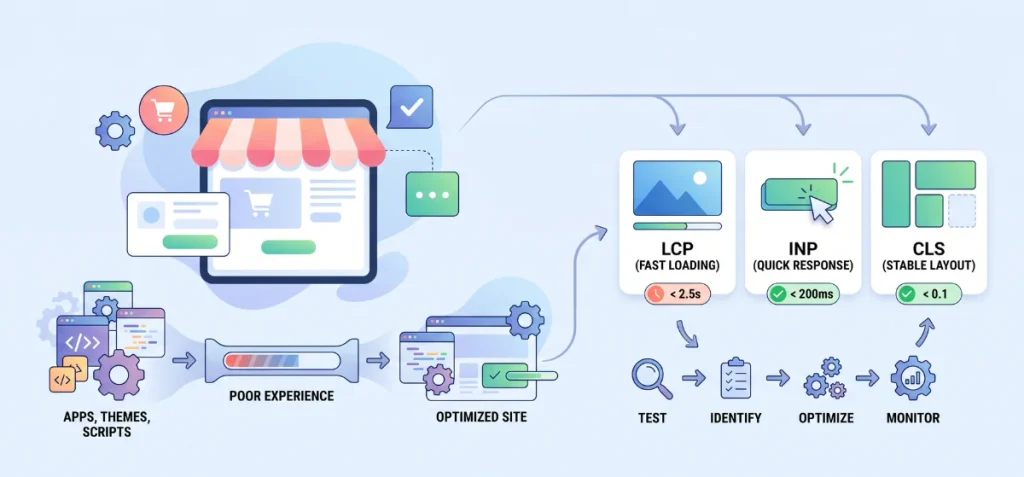
Many store owners blame slow load times on Shopify itself. The core platform infrastructure runs fast on modern content delivery networks.
Speed drops happen when you stack too many tracking tags, theme edits, and unoptimized assets on top of that base.
A common reaction is to delete every app in sight. That random approach rarely fixes the real issue. You must adopt a clear diagnostic approach instead. Every extra app injects third-party JavaScript files into your theme header.
Even when you uninstall an app, leftover tracking scripts and theme code snippets often remain behind. These dead files continue to block the main browser thread.
Uncompressed hero images, autoplaying videos, and third-party tracking pixels drag down mobile performance even further.
Mobile visitors browse on weaker processors and slower cellular connections, making bloated code far more painful on phones.
Google measures real user experience through Core Web Vitals rather than a single synthetic speed score.
Your store doesn’t get hit by an imaginary penalty just because a lab test shows an orange circle. Google uses Core Web Vitals as a real-world ranking factor to reward stores that provide smooth user experiences.
Run your main templates through Google PageSpeed Insights and aim for these current official thresholds:
- Largest Contentful Paint (LCP): <2.5 seconds. This measures how fast your main product image or banner loads.
- Interaction to Next Paint (INP): <200 milliseconds. This measures how quickly your store responds when a visitor taps a button, menu, or filter.
- Cumulative Layout Shift (CLS): <0.1. This measures whether text or buttons jump around while images load.
Follow this troubleshooting sequence to fix speed bottlenecks safely:
Test → Identify bottleneck → Remove or reduce source → Retest → Monitor field data
Begin by testing your key collection and product templates in PageSpeed Insights. Scroll down to the diagnostics section to identify which specific script or heavy image delays render times.
Defer non-critical JavaScript, switch product photos to modern WebP formats, and compress banner media. Retest the page in a fresh test environment.
Finally, monitor real user field data in Google Search Console over a 28-day window to confirm your fixes work in the real world.
6. Missing or Incorrect SEO Fundamentals
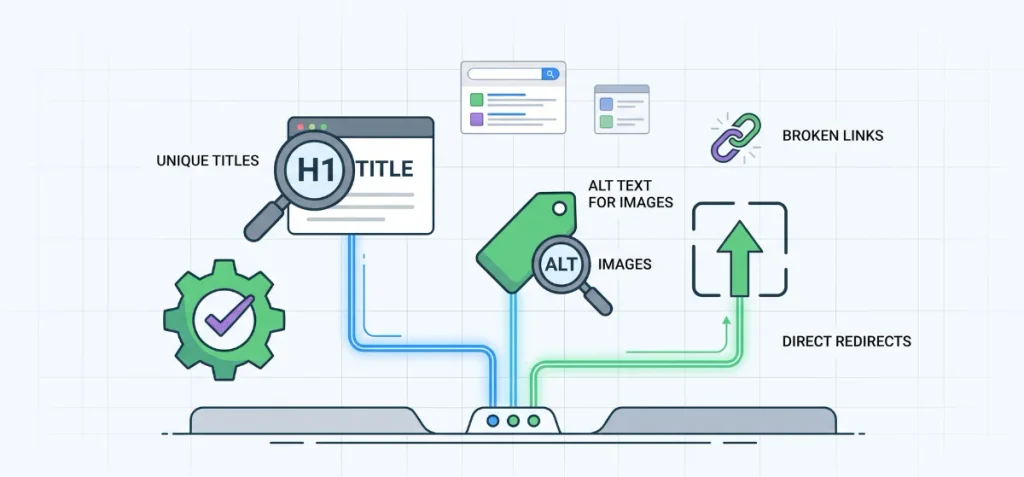
Minor technical oversights quietly compound into massive ranking drops across large catalogs. Fix these fundamental technical elements to keep your foundation solid.
Start by auditing your header titles and snippet copy. Shopify lets merchants edit titles and meta descriptions directly on products, collections, standard pages, and blog posts.
Never leave a Shopify meta title blank or allow multiple products to share the same title.
An important distinction applies to your Shopify meta description: search engines do not use meta descriptions as a direct algorithmic ranking lever.
Compelling descriptions improve search snippets and click-through rates from search results, which indirectly drives more traffic to your pages.
Inspect your page templates for heading and asset errors. Poor themes often assign H1 tags to store logos or promotional announcement bars instead of the actual product title. Every page needs exactly one unique H1 that clearly states the primary subject.
Fill out your Shopify image SEO details on all product galleries. Write short, accurate image alt text that describes the physical item for screen readers and search bots. Never stuff target keywords into every single product photo file.
Clean up your store links and URL redirects regularly. Out-of-stock removals and deleted pages trigger Shopify 404 errors that break crawl paths and frustrate buyers.
Build direct 301 Shopify redirects inside your admin dashboard whenever you retire an old item.
Avoid redirect chains where one old link bounces through two or three URLs before reaching the final page. Multiple hops slow down crawlers and dilute link signals.
Check your XML sitemap inside Google Search Console to verify that search bots index your live URLs without encountering redirect loops or dead ends.
If your team lacks the internal hours to fix these technical errors, consider hiring the best Shopify Plus SEO agency to handle your technical cleanup smoothly.
7. Missing, Invalid, or Misused Structured Data
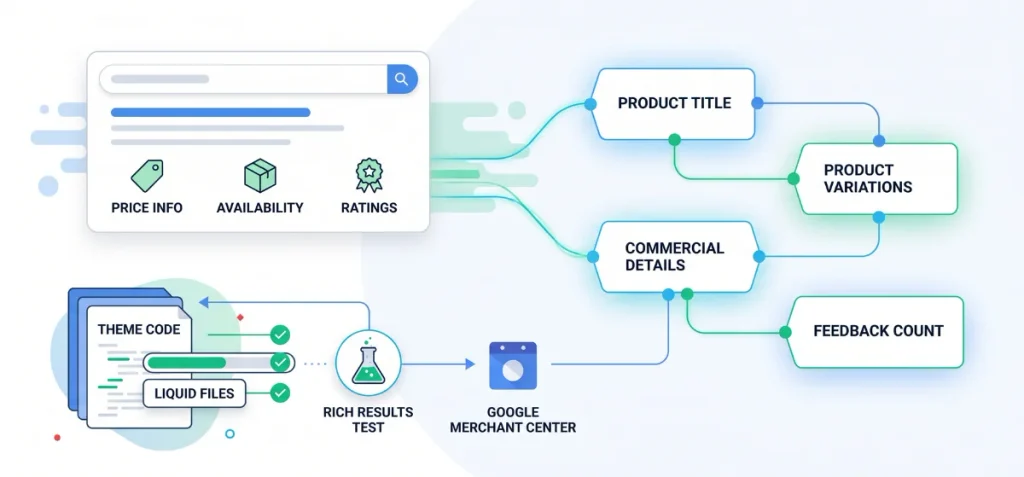
Search engines rely on structured data to interpret commercial information accurately. Without clear machine-readable code, Google must guess your prices, inventory levels, and customer ratings.
Proper e-commerce schema turns basic search results into rich snippets that display star ratings, stock status, and pricing directly on search pages.
Build your Shopify structured data around this practical e-commerce stack:
- Product: Defines the primary item, including title, brand, description, and images.
- ProductGroup: Connects item variations like size, color, or material under one parent entity.
- Offer: Communicates commercial details like price, currency, availability, and return terms.
- Review / AggregateRating: Displays authentic customer review scores and total feedback counts.
- BreadcrumbList: Clarifies your category hierarchy and navigation paths for search crawlers.
- Organization: Establishes your store name, logo, contact points, and official social profiles.
Many merchants rush to install a third-party app the moment schema enters the conversation. Never blindly install an extra app. Modern themes already output basic Shopify schema markup out of the box.
Stacking a dedicated schema app on top of a theme that already includes structured data creates conflicting or duplicate entities. These duplicate blocks confuse search crawlers and invalidate your rich snippet eligibility.
Audit your live code first. Test your URLs using the Google Rich Results Test to inspect what your theme already generates.
Google documentation on product structured data confirms that accurate markup improves Google’s contextual understanding of e-commerce items and qualifies pages for eye-catching visual enhancements.
Clean up missing fields in your Liquid files before adding new tools to your store. Ensure your product data also syncs cleanly with Google Merchant Center, so your shopping graph data matches your on-page code.
8. International SEO and Shopify Market Problems
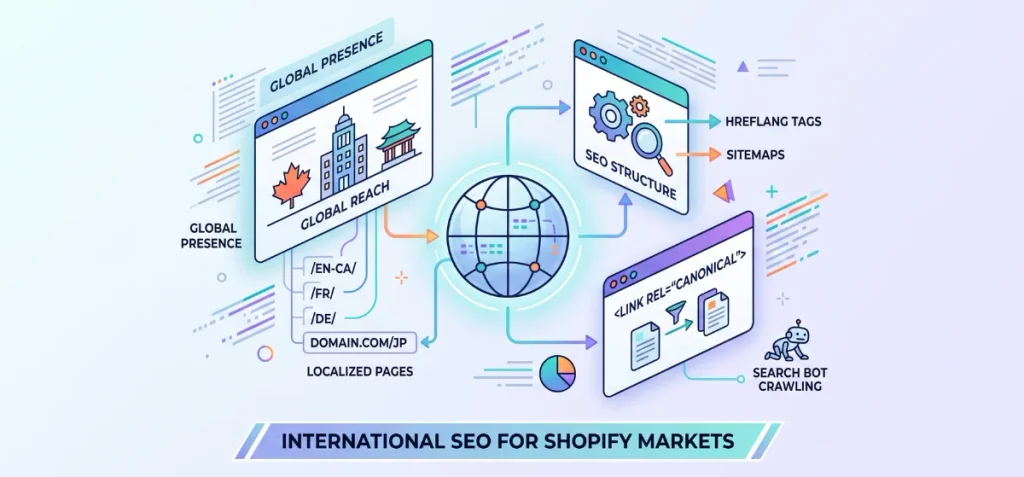
Selling globally creates complex URL and localization issues if you fail to manage regional settings properly.
Shopify Markets allows you to set up country and language URLs using subfolders (like /en-ca/ or /fr/), distinct subdomains, or dedicated country-code domains.
Subfolders work best for most brands because they consolidate your root domain authority across every region.
Search bots struggle when stores set up international targeting incorrectly. Shopify automatically generates hreflang tags in your theme header and creates market-specific sitemaps.
The platform also generates self-referencing canonical URLs for each localized page version.
Problems occur when store apps or custom theme scripts fight these automated rules.
If your theme forces all localized pages to point their canonical tag back to your primary market URL, search engines will simply ignore your translated regional pages.
You must also ensure that translated slugs match your localized content instead of showing raw, untranslated English paths.
Never use forced IP redirects to push foreign users or search bots into regional subfolders.
Googlebot crawls mostly from United States IP addresses. If your store blocks or automatically bounces non-local IPs, search crawlers can’t access your international content.
Keep crawler accessibility open and rely on clear language selectors rather than forced geo-redirects.
How to Find Shopify SEO Problems Before They Hurt Rankings
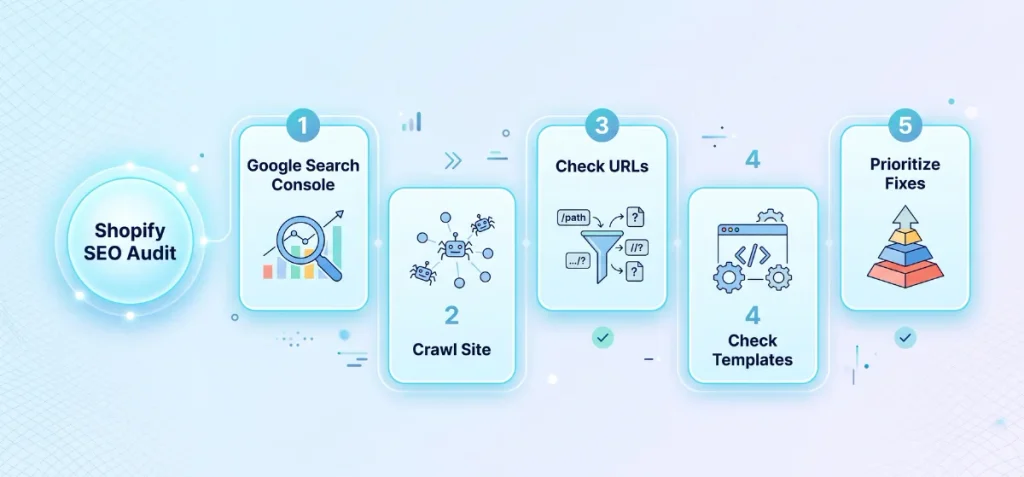
Technical audits help you catch silent indexing errors before organic sales fall. You can protect your search visibility by turning diagnostics into a routine maintenance task.
Follow this five-step audit sequence to catch and resolve Shopify SEO problems early.
1. Google Search Console
Google Search Console gives you an unfiltered look at how Google views your site. Open the Page Indexing report first.
Check the list of pages excluded from search to see why Google skips certain links. Look closely for issues labeled “Crawled – currently not indexed” or “Duplicate without user-selected canonical”.
Review your Core Web Vitals report to track real user speed scores across mobile devices. Check your search queries report to monitor whether primary keywords lose impressions over time.
Finally, paste important product and collection links into the top URL Inspection tool. Verify that Google’s chosen canonical matches your intended canonical tag.
2. Crawl the Site
Search engine bots crawl your store through links, so you must mirror their exact path. Run a full crawl of your storefront using an audit tool like Screaming Frog SEO Spider.
Configure the crawler to process JavaScript if your theme relies heavily on dynamic rendering.
Review the crawl data to spot duplicate title tags and identical meta descriptions across separate items.
Check canonical tag destinations to confirm every link points to a live page. Locate internal 301 redirects and broken 404 links so you can fix dead ends.
Filter your crawl results for orphaned pages that sit without any internal links from your main menus or category grids.
3. Check URL Patterns
Export your crawl URLs into a spreadsheet and filter them by directory path. Inspect these high-risk URL patterns:
- /collections/*/products/* paths that split signals with direct product links.
- Filter parameters containing query strings like ?filter. or ?v.option..
- Old tag URLs that use paths like /collections/all/tag-name.
- Sort parameter links like ?sort_by=price-ascending.
- Paginated series containing paths like ?page=2.
- Multi-hop redirect chains where one old product hops through several URLs.
4. Check Template-Level Problems
Shopify operates on modular Liquid templates. One single line of bad code can duplicate across your entire catalog instantly. Check whether an error appears on a single isolated page or across every item in a collection.
Open five product pages and five collection pages in separate browser tabs. View the raw page source code across each tab. Check if the primary H1 tag renders properly on every page.
Confirm whether canonical tags output clean addresses consistently. If an error appears across all five tabs, fix the root issue directly inside your master theme files instead of editing pages one by one.
5. Prioritize by SEO Impact
Do not waste hours tweaking isolated image tags while major pages fail to index. Focus your time on errors that hurt your store traffic the most. Use this prioritization order:
Indexing and crawl problems → Duplicate URL problems → High-value page quality → Site performance → Metadata → Minor cleanup
Fix pages that cannot get indexed first. Clean up duplicate URL loops next so Google understands your primary pages. Add descriptive text to thin commercial pages after URL paths work smoothly.
Tune your code to improve Core Web Vitals scores once your content structure stands firm. Save meta descriptions and minor tag cleanup for last. This logical order keeps your efforts focused on changes that move search rankings.
Which Shopify SEO Problems Should You Fix First?
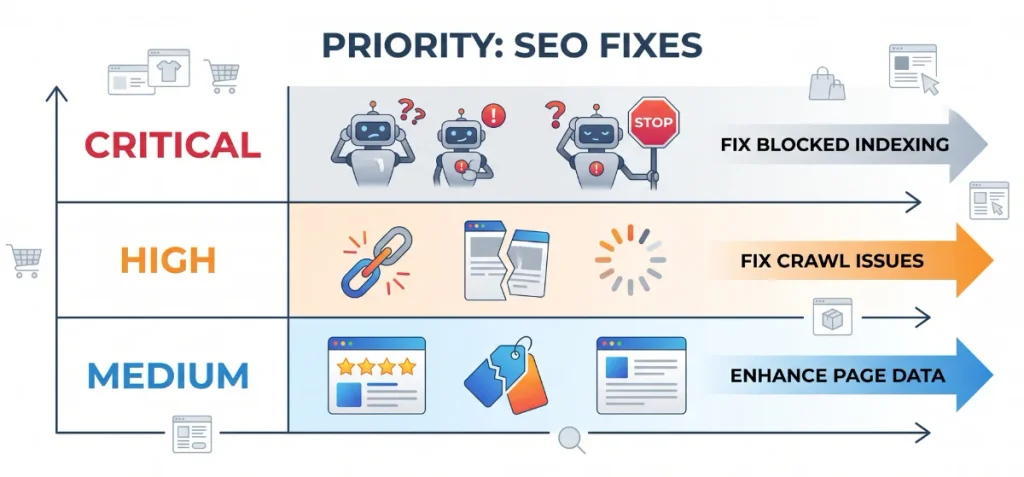
Fixing every minor warning on a site audit wastes precious hours. Focus your energy on technical bottlenecks that block search bots from reading your best products.
Use this compact matrix to schedule your fixes by operational impact:
| Priority | Problem | Why It Matters |
| Critical | Important pages not indexed | A page cannot rank or earn traffic if Google cannot add it to the search index. |
| Critical | Massive crawlable filter or duplicate URL sets | Endless parameter strings waste crawl budget and confuse search engine indexing signals. |
| High | Canonical and internal link conflicts | Mismatched links weaken URL consolidation and split ranking signals across duplicate paths. |
| High | Thin commercial pages | Empty grids and short supplier copy offer weak search relevance and fail to meet buyer intent. |
| High | Poor Core Web Vitals | Slow load speeds and unstable page elements hurt mobile user experience. |
| Medium | Broken links and redirect issues | Dead ends frustrate shoppers and break internal crawl paths across your catalog. |
| Medium | Metadata issues | Missing or weak snippets reduce search click-through rates. |
| Medium | Structured data issues | Broken or missing schema reduces rich-result eligibility in organic search results. |
Resolve your critical crawl and indexing errors before touching minor on-page tags.
Once search bots can read and crawl your primary templates without hitting dead loops, move on to content depth and speed optimizations to climb past competing stores.
Final Thoughts
You can solve most Shopify SEO problems with simple, consistent fixes. Check your links every month. Point your theme menus straight to primary product pages. Block useless filter combinations from search bots.
Add helpful descriptions to your main collection pages. Remove unused app scripts to keep load speeds fast. Take these steps in order. Your store will gain steady organic traffic and attract more paying buyers.
FAQs
Is Shopify Bad for SEO?
No. Shopify handles core technical basics like sitemaps and canonical tags well. It only creates issues if you mismanage app code, filter bloat, or rigid URL folders.
What is the Biggest SEO Problem with Shopify?
Uncontrolled duplicate content is the largest issue. The platform creates multiple web addresses for identical items through variant parameters, tag combinations, and dual collection paths.
How Do I Fix Duplicate Content in Shopify?
Verify your canonical_url tag in theme.liquid. Remove within: collection from theme code, so links point to root product URLs. Redirect deleted duplicate paths with 301 rules.
Should I Noindex Shopify Filter Pages?
Yes, add noindex and follow tags to low-value filter combinations. Keep specific filter URLs indexed only if they target high-demand keywords with unique, helpful on-page copy.
Does Shopify SEO Affect Google AI Overviews?
Yes. Google AI Overviews extract store facts directly from structured data and semantic page copy. Clean product schema and fast, crawlable liquid code improve your visibility in AI-generated answers.